Multi-vocabulary search order
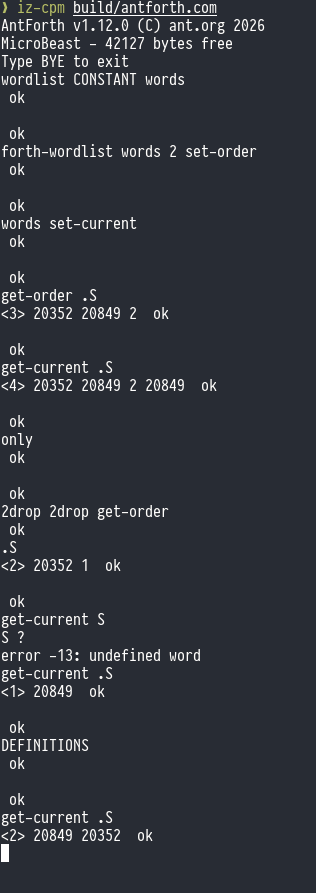
Epic 12 is all about vocabularies and search orders. Up to now, all AntForth words (be they system defined or user defined) have lived in a single dictionary. You may recall that the dictionary is a simple hash-based mechanism that manages 64 separate lists of words: the hashing function balances the allocation of words between them.
Epic 12 allows us to have multiple dictionaries, to control the order in which they are searched, and to control to which dictionary new word definitions will be written.
This will make AntForth compliant with the ANS Forth Search-Order word set, and it also
implements a word from the Search-Order extensions word set (ONLY).
Many of the other words in the Search-Order extensions are the ancient precursors of
modern search-order support, which is now effectively obsolete, the most familiar
is probably ALSO. Curiously there is no corresponding VOCABULARY word, without
which ALSO makes no sense.
In fact I probably shouldn’t use the word “vocabulary” at all as it is synonymous with the old ways, but it is semantically correct.
FORTH-WORDLIST
Previously all of AntForth’s built-in words lived in the single, anonymous dictionary. In
a new multi-dictionary world, their dictionary is but one of many. To get a handle on
this dictionary we use the new word FORTH-WORDLIST.
This is essentially a dictionary hash management structure (64 pointers to lists) plus a link pointer to the next wordlist in the chain. The value returned is called a wid (word-list identifier).
WORDLIST
WORDLIST is how you create and allocate a new wordlist. It allocates 130 bytes for the
hash-list dictionary structure, initialises it with sane values, and returns the address
of this structure in TOS as a wid.
SEARCH-WORDLIST
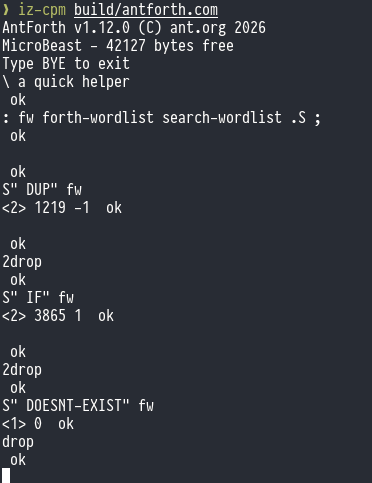
SEARCH-WORDLIST allows you to search a specific word list (and not the entire search
order) for the word identified by the given string. If the word exists, it returns the
xt for that word, along with a 1 if the word is immediate, or a -1 if it is not.
SEARCH-WORDLIST takes the address and count of the name, plus the wid of the word
list to be searched.
GET-ORDER
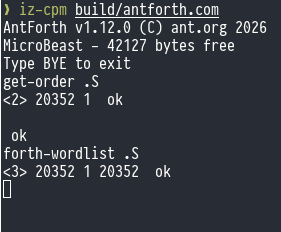
GET-ORDER returns a list of wids that comprise the current search order to the stack,
along with the current search depth.
When AntForth has just started, the search-order only contains a single wid ( that for
FORTH-WORDLIST) and the search depth is 1.
SET-ORDER
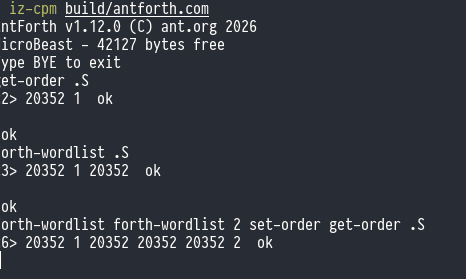
SET-ORDER performs the reverse operation to GET-ORDER: it takes a search depth and
a list of wids from the stack and writes the search-order list from them. You can have
up to 16 different wids in the search-order.
There’s no checking for duplicate wids - it’s perfectly permissible (although pointless) to have the same wid appear twice. It means the same wordlist will be searched twice, but obviously if said wordlist contains the word of interest, its first incarnation will find a match and its second incarnation will not be invoked. If the word does not exist, the wordlist will be searched twice, the second being fruitless. It does mean I can make this example though:
GET-CURRENT, SET-CURRENT, and DEFINITIONS
The words we’ve discussed so far cover searching for words: how do we control which word-list receives a new word definition?
In ANS Forths this is called the “compilation word-list” or sometimes “current word-list”,
and you can get it with GET-CURRENT (which returns a wid to TOS) or set it with SET-CURRENT
which takes a wid from TOS.
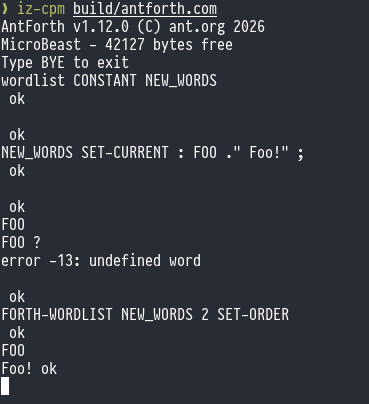
DEFINITIONS is equivalent to setting SET-CURRENT to whichever wid is currently first
in the search-order: new definitions go to the first dictionary in the currently active
set of dictionaries.
ONLY
ONLY is the sole-surviving refugee from the old Forth Vocabulary era: its purpose is
to set the search-order back to the default state: that is, a single wid which is that of
FORTH-WORDLIST and a search depth of 1.
Note that this doesn’t change the setting of the “compilation word-list”, so you may
want to combine ONLY with DEFINITIONS for a true reset.