Variables, Constants, and DOES>
This story is another exciting one, because it will significantly
extend AntForth’s capabilites by giving it new defining words
VARIABLE, CONSTANT and DOES>.
What’s a defining word?
A defining word is simply a word that lets us define new words
of our own. So far, we have only encountered one defining word,
: (COLON) – and it’s a powerful one.
In this story we will gain:
VARIABLE: a defining word that lets us define variablesCONSTANT: a defining word that lets us define constantsCREATE: a word that lets us create parameter-less dictionary entriesDOES>: a word that lets us make our own defining wordsCELLS: convert “number of cells” to “number of bytes”
DOES> is some next-level Forth magic, and thinking about it
at the story-creation phase caused Claude to go into a doom
spiral - lots of “actually…wait…no….actually…let me try a different approach…”
in the main story planning document. Not good, but hardly surprising,
as DOES> is a bit meta. I intervened and explained how the
Forthfathers (I just made that up, but I’m very pleased with it and
will be using it a lot) solved this exact problem decades ago.
I will defer the details until later, as we need to lay down some more foundational knowledge first.
VARIABLE
VARIABLE is a defining word that lets us define a word that is
a variable. All it really does is create a dictionary entry,
allocate a single cell for it, and whenever the word is used
that cell’s address is pushed to the stack.
The idea is that you then use ! (“store”) and @ (“fetch”) to
read and write the value of the variable. I can’t demonstrate
in AntForth as this functionality doesn’t yet exist, but here’s
an example in GForth:
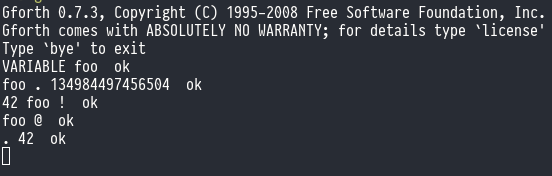
The word foo is entered into the dictionary with a CF of
JP DOVAR, and all DOVAR does is push the PFA (Parameter Field Address)
to the parameter stack. That’s the big number you see returned
by foo ..
The Parameter Field is initially a single cell that is allocated by
the VARIABLE keyword. This is crucial for later understanding, so
remember that VARIABLE always allocates one cell.
CONSTANT
CONSTANT is a defining word that lets us define a constant.
It’s a named numeric quantity that can’t be assigned to (although
it can be re-defined with a different value).
Here’s an example in GForth:
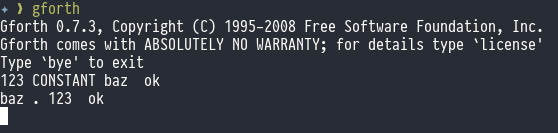
The word vaz is entered into the dictionary with a CF of
JP DOCONST, and all DOCONST does is push the PF (Parameter Field)
to the parameter stack – NOT the PFA (parameter field address), like
VARIABLE did. You can see this when we type baz . and get
123 back. No addresses are revealed, and we have nothing we can
! and @.
CREATE
CREATE is exactly like VARIABLE, the only difference is that
CREATE does NOT do an implicit allocation of the first cell.
It still evaluates to return the PFA, but it’s up to you to store
something sensible in there: if you don’t the PFA will be the address
of the link field that next gets added to the dictionary.
CREATE is commonly used with ALLOT or DOES> or , (COMMA) to
do something more useful.
For example:
CREATE myArray 10 CELLS allot
This creates s 10-cell array, the address of the first element is
returned by myArray.
DOES>
DOES> is usually used in partnership with CREATE, and it does
something a lot more special. DOES> lets you specify some code
in the defining word which is executed by any word that is
defined by that new defining word, whenever it is evaluated.
For example you could implement CONSTANT using CREATE and DOES>:
: CONSTANT    (n -- )
    CREATE  ,        \ create the entry, store n in its parameter field
    DOES>            \ runtime: when the created word is called...
        @            \ fetch the value from the PFA
;
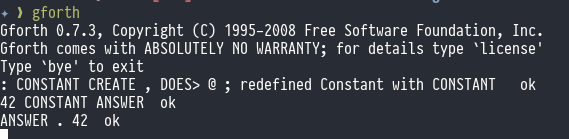
Obviously CONSTANT isn’t really implemented like that: it’s usually
a code word (a machine code primitive routine).
Here’s another example:
: ARRAY (n --)
    CREATE CELLS ALLOT
    DOES>    ( index addr -- element-addr )
        SWAP CELLS +
;
And here it is in action:
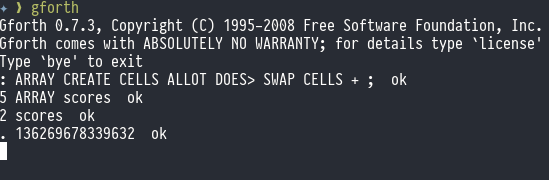
We’ve written a custom array datatype that returns the cell address of any index that we give it.
There are a number of ways people like to visualise this:
- the Code Field is an “action” and the Parameter Field is the data upon which it acts
- the Code Field is a subroutine call, and the Parameter Field contains parameters that are included “in line” before the call.
- the code field is the “method” in a class that has only one method, and the Parameter Field contains the “instance variables”.
- It’s a closure:
DOES>defines the function body and the PF contents are the captured environment (the closed-over data).
I prefer the last one, so 42 CONSTANT ANSWER roughly maps to:
const ANSWER = (() => { const pfa = 42; return () => pfa; })();
Every constant is a closure over its own private PFA. CREATE...DOES> is
Forth’s way of manufacturing closures without needing a heap or first-class
functions - it just stamps them out directly into the dictionary.
In a language with real closures, each closure instance gets its own private copy of the captured variables on the heap. In Forth, each created word gets its own private PFA in the dictionary. The dictionary is the heap, in a sense — just a very simple, append-only one.
And just like closures can capture mutable state, so can DOES> words.
A VARIABLE-like thing built with `CREATE...DOES> captures a mutable cell in its
PFA. Each instance has its own independent state, just like:
function makeCounter() {
    let n = 0;
    return () => ++n;
}
const c1 = makeCounter();
const c2 = makeCounter();
is analogous to:
: COUNTER   CREATE 0 ,   DOES>  dup @ 1+ dup rot ! ;

COUNTER C1
COUNTER C2
C1 and C2 each have their owb count cell and are completely independent.
The deep difference is that in Forth the “closure” is reified as a named dictionary entry — it has an address, you can call it by name, and its captured environment is at a known fixed location. There’s no garbage collection, no heap fragmentation, no indirection through a function pointer table. It’s a closure you can look at with a hex dump.
What’s really cool is, the massively-deferred behaviour that DOES>
introduces (its code runs when a word that is defined by the word
being defined) is effected by DOES> running in immediate mode.
In other words, while your compiling that defining word the DOES>
clause executes immediately.
Let that sink in for a little bit…
Let’s return to our example:
: ARRAY CREATE CELLS ALLOT DOES> SWAP CELLS + ;
Level 1: compiling the defining word
When : ARRAY ... DOES> ... ; is compiled, DOES> fires immediately
and simply compiles (DOES>) (the parens are part of its name) into
ARRAY’s thread. The words after DOES> — SWAP CELLS + are compiled
normally into the thread after it (and their address is does-addr
below). ; appends EXIT.
Nothing unusual happens yet. ARRAY’s thread just contains (DOES>)
as a token sitting there waiting.
Level 2: running the defining word
When we run 10 ARRAY MYDATA, ARRAY’s thread executes.
CREATE builds MYDATA’s dictionary entry with JP DOVAR in its
CFA and zeroes in its does-addr slot. CELLS ALLOT populates the body.
Then (DOES>) executes:
- At this moment DE (IP) points to
SWAP— the first token of theDOES>body, because that’s the next thing inARRAY’s thread (DOES>)patchesMYDATA’s CFA: overwritesJP DOVARwithJP DODOES- Writes DE (the
does-addr, pointing atSWAP) intoMYDATA’s CF+3 slot - Then does an
EXIT— pops IP from the return stack and returns to whoever calledARRAY
MYDATA’s dictionary entry now permanently contains JP DODOES +
the address of SWAP CELLS +.
Level 3: running the created word
When we run 3 MYDATA, NEXT dispatches through MYDATA’s CFA
hitting JP DODOES, which:
- Saves the current IP to the return stach (like
DOCOLdoes) - Reads the
does-addrfrom CF+3 - the address of theSWAP - Sets IP (DE) to
does-addr, so execution will continue atSWAP CELLS + - Pushes CF+5 (
MYDATA’s body address) as the new TOS - Drops into
NEXT.
Now SWAP CELLS + executes with the body address on the stack,
computing the element address. EXIT at the end pops IP from
the return stacj and returns normally.
In summary:
| Level | Who acts | What happens |
| +++++ | ++++++++ | ++++++++++++ |
| 1 | DOES> (IMMEDIATE) |
compiles (DOES>) into ARRAY’s thread |
| 2 | (DOES>) |
patches MYDATA’s CFA to JP DODOES, stores the does-addr |
| 3 | DODOES |
saves IP, loads does-addr into IP, pushes body address |
You can probably start to see why Claude was getting tied up
in knots. The mean reason for its anguish was where to store
does_addr, as a CFA is only three bytes and whatever solution
we come up with needs to still work with VARIABLE et al.
We solved it with:
 I don't think the proposed approach is going to work. I think
CREATE should always reserve two bytes for does-addr and we'll
pay that penalty for all defining words. So CREATE always lays
down CFA+0: JP DOVAR CFA+3: 0000 (does-addr slot)
CFA+5: ... (user data). In other words, does-addr is a hidden
prefix to the PFA and `>BODY` skips over it. VARIABLE et al
never write a does-addr, so for them the hidden prefix doesn't
exist and `>BODY` == CFA+3. For `DOES>` patched words
`>BODY` is CFA+5. The JP in the CFA tells DODOES which case
its in.
Incidentally, the reason for the > in DOES> is because
pre-ANS Forth CREATE was known as <BUILDS, so you got
matching opening and closing chevrons, which got lost when
ANS standardised it.
More recently, modern Forths which
use flash-based dictionaries (and which are therefore
unable to overwrite JP DOVAR with JP DODOES) have co-opted
it to mean any kind of mechanism where the toolchain can be
made to perform a similar sort of late binding before the
code is flashed. Every implementation does this differently
and it doesn’t affect our z80 port, so I won’t digress any
further.
That was a big old slab of Forth theory: let’s have a look at the code.
memory.asm
CELLS is probably the simplest word so far:
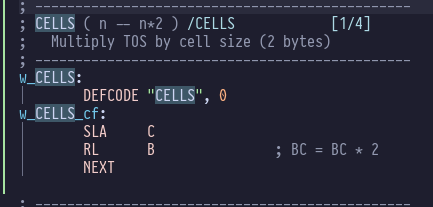
It basically takes a number (“number of cells”) and multiplies it by 2 to get “number of bytes”, since in AntForth each cell is 2 bytes.
bootstrap.asm
In this file of bootstrap words defined in a Forth-like
style with DEFWORD, we now have VARIABLE:
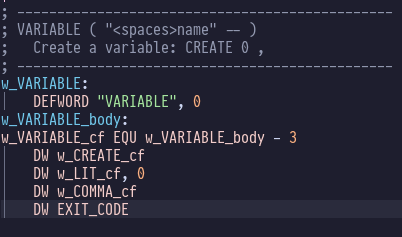
It’s basically defining a word like : VARIABLE CREATE 0 , ;.
inner_interpreter.asm
In the inner interpreter we gained some helper words. First,
DOVAR:
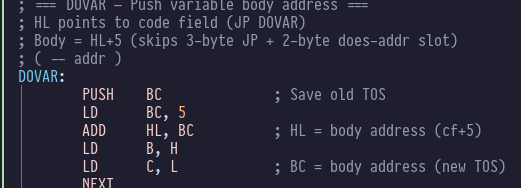
This advances HL past the JP DOVAR and does_addr in the
dictionary entry so that it points to the Parameter Field,
then sticks that address on the stack.
We also have DOCON:
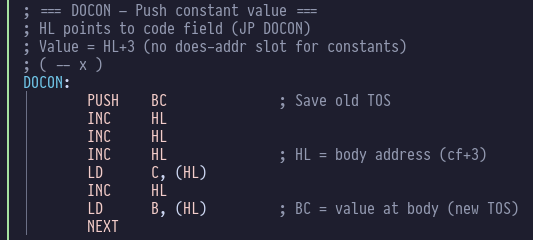
Similarly this skips the JP DOCON stored in the dictionary
entry, but it doesn’t bother skipping does_addr: constants
re-use does_addr to store their value. So this routine
fetches the value stored in CF+3 (the address formerly
known as does_addr) and pushes that on to the parameter
stack.
Finally we have DODOES:
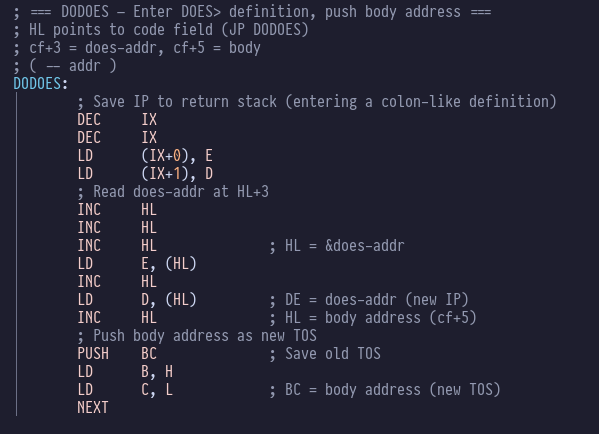
We’ve already covered what it does in depth: here you can see it pushing the body address onto the top of the parameter stack.
compiler.asm
In here we’ve now got CREATE, CONSTANT, DOES> and
(DOES>). Let’s have a little look at DOES:
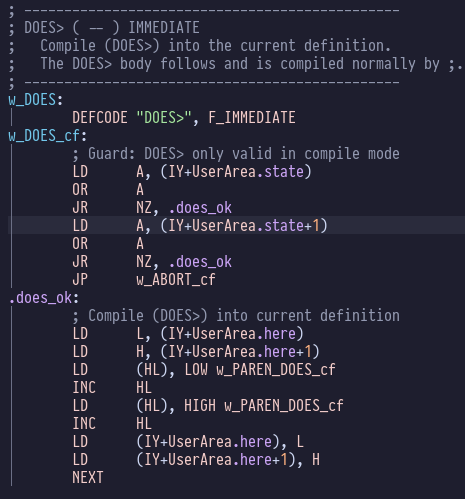
First it’s checking that we’re in compile mode, and if we
are it stores a pointer to w_PAREN_DOES_cf in the next
free slot in the dictionary entry, which is represented
by UserArea.here.
Here’s (DOES>):
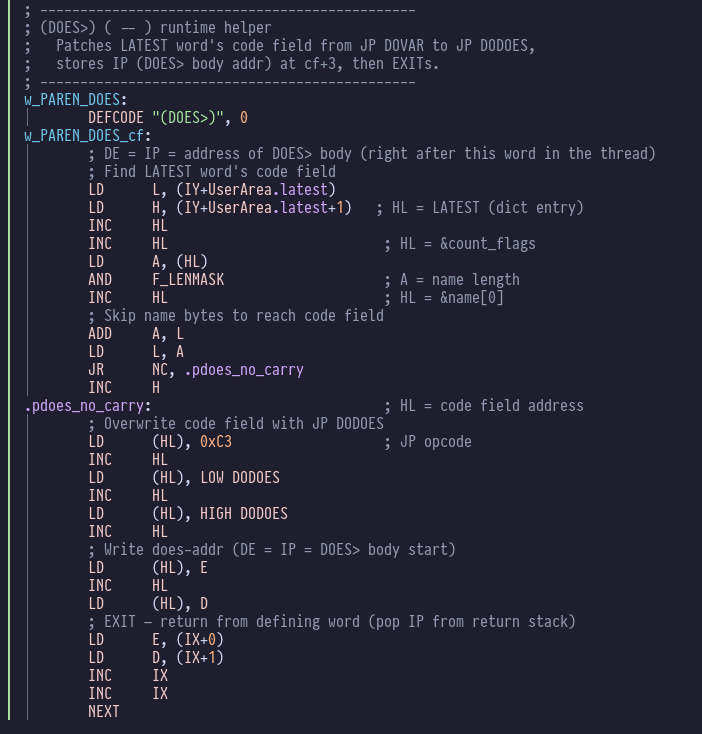
You can see it overwriting JP DOVAR with JP DODOES and
storing does_addr in the following cell.
Everything matches our understanding of how this should work, but will it blend ?
Testing
Let’s find out! Unit tests and interactive tests all pass, so let’s get straight into the AntForth interpreter:
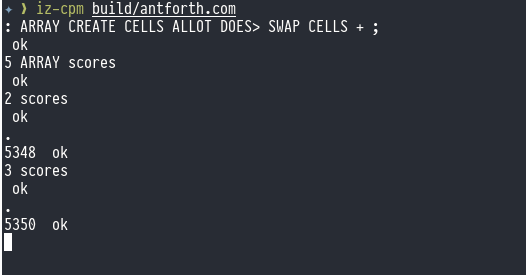
Marvellous.