Your name in lights! (Part 10)
Last time, we got a simple scrolltext that can scroll any text the user enters working.
This time we’re going to add a bit of bling and resurrect our brightness wave, and hopefully we’ll see that machine code has the power to make it more impressive than our BASIC effort.
To move forward, I’m going to assume that you’ve got SLIDE.COM on the B: drive of your ‘Beast, and that you have the corresponding PC utility installed somewhere in your PATH on your development PC. Refer to the SLIDE README if you need more help with that.
Set up
First things first: clone the Beast User repository on to your development PC.
We’re going to start in the scrolltext/assembler/effects folder.
Background info
Just like the previous example, we’re going prompt the user for the string, decode the characters of that string into font symbols, and scroll the characters on the screen - but this time there will be a wave of brightness moving through the string characters!
Here’s the code:
1
2
3
4
5
6
7
8
9
10
11
12
13
14
15
16
17
18
19
20
21
22
23
24
25
26
27
28
29
30
31
32
33
34
35
36
37
38
39
40
41
42
43
44
45
46
47
48
49
50
51
52
53
54
55
56
57
58
59
60
61
62
63
64
65
66
67
68
69
70
71
72
73
74
75
76
77
78
79
80
81
82
83
84
85
86
87
88
89
90
91
92
93
94
95
96
97
98
99
100
101
102
103
104
105
106
107
108
109
110
111
112
113
114
115
116
117
118
119
120
121
122
123
124
125
126
127
128
129
130
131
132
133
134
135
136
137
138
139
140
141
142
143
144
145
146
147
148
149
150
151
152
153
154
155
156
157
158
159
160
161
162
163
164
165
166
167
168
169
170
171
172
173
174
175
176
177
178
179
180
181
182
183
184
185
186
187
188
189
190
191
192
193
194
195
196
197
198
199
200
201
202
203
204
205
206
207
208
209
210
211
212
213
214
215
;
; MicroBeast LED Demo - Step 5: Sine Wave Brightness Effect
; Scrolling text with a sine-wave brightness pattern that moves
; across the display at a different rate than the text scroll.
;
; Build: sjasmplus --raw=effects.com effects.asm
; Run:   effects.com under CP/M on MicroBeast
;

            ORG     0x100

            INCLUDE "../bios.inc"

; --- Print prompt ---
            LD      DE, prompt
            LD      C, C_WRITESTR
            CALL    BDOS

; --- Read user input ---
            LD      DE, inbuf
            LD      C, C_READSTR
            CALL    BDOS

            LD      DE, crlf
            LD      C, C_WRITESTR
            CALL    BDOS

; --- Build padded buffer: 24 spaces + text + 24 spaces ---
            LD      HL, padbuf
            LD      BC, 303
            LD      A, ' '
clrbuf:
            LD      (HL), A
            INC     HL
            DEC     BC
            LD      A, B
            OR      C
            LD      A, ' '
            JR      NZ, clrbuf

            LD      A, (inbuf+1)
            OR      A
            JR      Z, startloop
            LD      B, A
            LD      HL, inbuf+2
            LD      DE, padbuf+24
copytxt:
            LD      A, (HL)
            LD      (DE), A
            INC     HL
            INC     DE
            DJNZ    copytxt

startloop:
            ; Calculate scroll positions: textlen + 25 (16-bit)
            LD      A, (inbuf+1)
            LD      L, A
            LD      H, 0
            LD      BC, 25
            ADD     HL, BC
            LD      (buflen), HL

            LD      DE, scrollmsg
            LD      C, C_WRITESTR
            CALL    BDOS

            ; Initialize counters
            LD      HL, 0
            LD      (scrollpos), HL
            XOR     A
            LD      (brightpos), A
            LD      (framecnt), A

; --- Paint characters for current scroll position ---
painttext:
            LD      HL, (scrollpos)
            LD      DE, padbuf
            ADD     HL, DE
            LD      (winptr), HL

            LD      C, 0           ; column counter
paintloop:
            LD      A, C
            CP      24
            JR      Z, brightloop

            PUSH    BC

            LD      HL, (winptr)
            LD      E, C
            LD      D, 0
            ADD     HL, DE
            LD      A, (HL)        ; ASCII character

            SUB     0x20
            CP      95
            JR      C, validch
            XOR     A
validch:
            ADD     A, A
            LD      E, A
            LD      D, 0
            LD      HL, font
            ADD     HL, DE
            LD      A, (HL)
            INC     HL
            LD      H, (HL)
            LD      L, A           ; HL = bitmask

            LD      A, C
            CALL    MBB_WRITE_LED

            POP     BC
            INC     C
            JR      paintloop

; --- Update brightness every frame ---
brightloop:
            LD      C, 0           ; column counter
brightcol:
            LD      A, C
            CP      24
            JR      Z, brightdone

            PUSH    BC

            LD      A, (brightpos)
            ADD     A, C           ; A = column + brightpos
            AND     63             ; modulo 64
            LD      E, A
            LD      D, 0
            LD      HL, sine64
            ADD     HL, DE
            LD      A, (HL)        ; A = brightness value

            LD      B, A           ; save brightness in B
            LD      A, C           ; A = column
            LD      C, B           ; C = brightness
            CALL    MBB_LED_BRIGHTNESS

            POP     BC
            INC     C
            JR      brightcol

brightdone:
; --- Delay ---
            LD      HL, DELAY_COUNT
delay:
            DEC     HL
            LD      A, H
            OR      L
            JR      NZ, delay

; --- Check for keypress ---
            LD      C, C_STAT
            CALL    BDOS
            OR      A
            JR      NZ, exit

; --- Advance brightness offset every frame ---
            LD      A, (brightpos)
            INC     A
            AND     63
            LD      (brightpos), A

; --- Advance text scroll every 4th frame ---
            LD      A, (framecnt)
            INC     A
            AND     3
            LD      (framecnt), A
            JR      NZ, brightloop ; no text change, just update brightness

            ; Advance scroll position (16-bit)
            LD      HL, (scrollpos)
            INC     HL
            LD      DE, (buflen)
            OR      A              ; clear carry
            SBC     HL, DE
            JR      C, nowrap
            LD      HL, 0
            JR      savescroll
nowrap:
            ADD     HL, DE         ; restore scrollpos
savescroll:
            LD      (scrollpos), HL
            JP      painttext

exit:
            ; Read key to clear it
            LD      C, C_READ
            CALL    BDOS
            JP      P_TERMCPM

; --- Constants ---
DELAY_COUNT EQU     0x4000          ; faster than scrolltext (brightness updates more often)

; --- Data ---
prompt:     DB      'Enter scroll text: $'
scrollmsg:  DB      'Scrolling with effects... press any key to stop', 13, 10, '$'
crlf:       DB      13, 10, '$'

inbuf:      DB      255
            DB      0
            DS      256            ; +1 for CR terminator

scrollpos:  DW      0              ; 16-bit scroll offset
brightpos:  DB      0
framecnt:   DB      0
buflen:     DW      0              ; 16-bit scroll position count
winptr:     DW      0

padbuf:     DS      303            ; 24 + 255 + 24

            INCLUDE "../font.asm"
            INCLUDE "../sine64.asm"
Again, a hefty slice of code pie, but most of this should look very familiar from last time. I’ve separated the main loop into two sections paintloop and brightloop to make it easier to follow. The only bit that’s new is writing the LED brightness values:
1
2
3
4
5
6
7
8
9
10
11
12
13
14
15
16
17
18
19
20
21
22
23
24
25
26
27
28
29

; --- Update brightness every frame ---
brightloop:
            LD      C, 0           ; column counter
brightcol:
            LD      A, C
            CP      24
            JR      Z, brightdone

            PUSH    BC

            LD      A, (brightpos)
            ADD     A, C           ; A = column + brightpos
            AND     63             ; modulo 64
            LD      E, A
            LD      D, 0
            LD      HL, sine64
            ADD     HL, DE
            LD      A, (HL)        ; A = brightness value

            LD      B, A           ; save brightness in B
            LD      A, C           ; A = column
            LD      C, B           ; C = brightness
            CALL    MBB_LED_BRIGHTNESS

            POP     BC
            INC     C
            JR      brightcol
We’re writing brightness values to each of the 24 LED characters that we’ve pulled from our sine table, which only has 64 entries so we’re using AND 63 to do some modulo arithmetic.
Once we’ve finished a ‘frame’ or iteration, we delay and check for a keypress as before, and then we do this:
1
2
3
4
5
6
7
8
9
10
11
12
13
14
15
16
17
18
19
20
21
22
23
24
25
26
27
; --- Advance brightness offset every frame ---
            LD      A, (brightpos)
            INC     A
            AND     63
            LD      (brightpos), A

; --- Advance text scroll every 4th frame ---
            LD      A, (framecnt)
            INC     A
            AND     3
            LD      (framecnt), A
            JR      NZ, brightloop ; no text change, just update brightness

            ; Advance scroll position (16-bit)
            LD      HL, (scrollpos)
            INC     HL
            LD      DE, (buflen)
            OR      A              ; clear carry
            SBC     HL, DE
            JR      C, nowrap
            LD      HL, 0
            JR      savescroll
nowrap:
            ADD     HL, DE         ; restore scrollpos
savescroll:
            LD      (scrollpos), HL
            JP      painttext
Here we’re incrementing brightpos every time around, because we want our brightness wave to be fast. We’re also updating framecnt, but we only advance the text scroll position every 4th increment of framecnt.
Assembling the code
You can assemble the code manually with sjasmplus --raw=effects.com effects.asm and if all goes well you’ll produce a file effects.com that you can run on your ‘Beast. Or add it to your script/Makefile if you went down that route.
Running the code
The procedure to run effects.com on the ‘Beast is similar to what we’ve used before, but slightly shorter:
- Boot your ‘Beast
- SLIDE the
EFFECTS.COMfile from the repo across to your ‘Beast’s B drive - while still logged-in to the
Bdrive, typeEFFECTSand hit enter
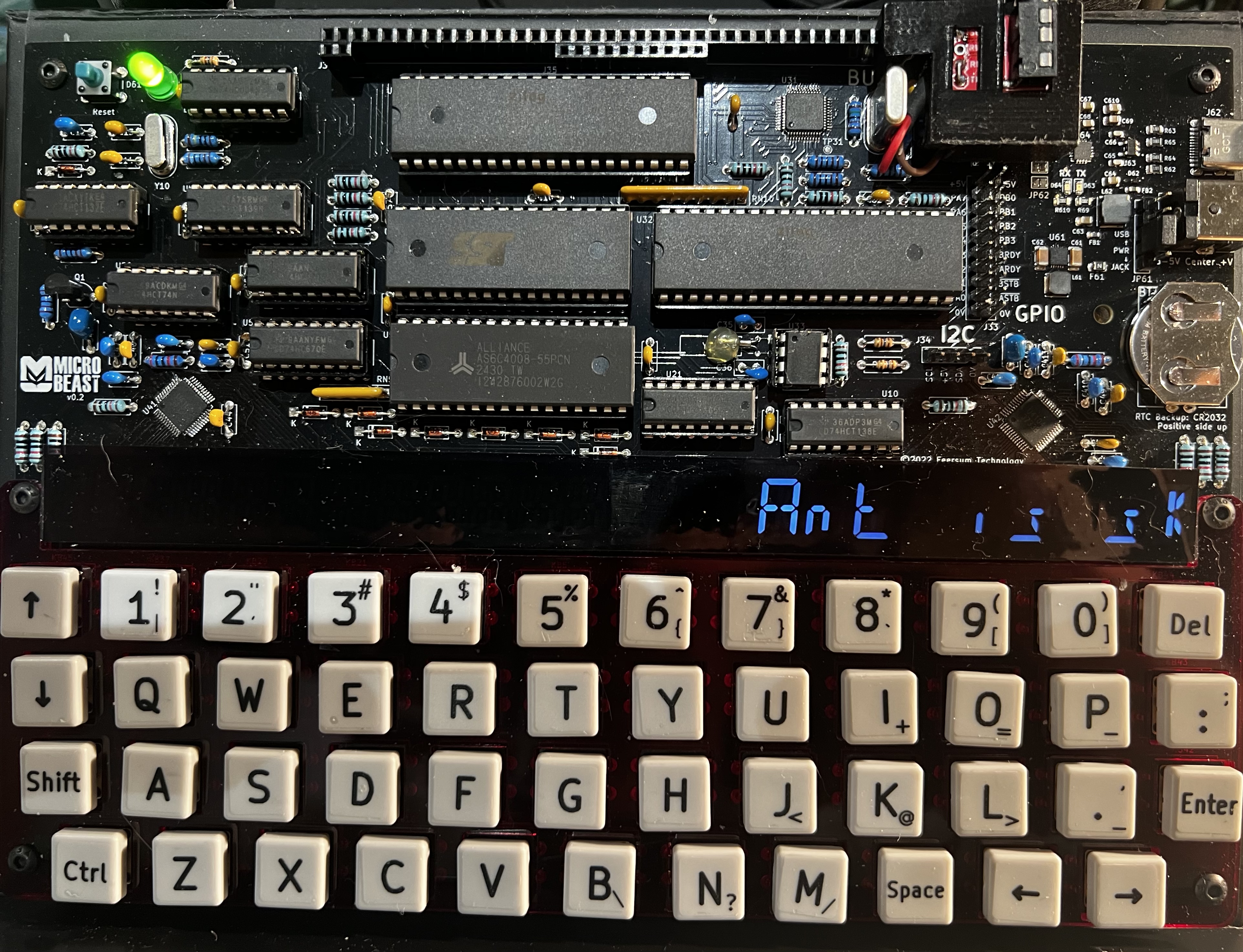
All being well, you should see this (your string might be different):
Things you can try
- Experiment with different delay values
- how would you speed up or slow down the brightness wave relative to the scroll speed?
- can you make the brightness wave go in the opposite direction?
- can you make the scrolling text go in the opposite direction?
- can you think of any other cool effects you could add? Maybe by having a different brightness lookup table?
End of the series
That’s the end of Part Ten, and the end of the series. Well done for making it this far! I hope these articles have inspired you explore the potential of your ‘Beast, and that you’re now fizzing with ideas for new machine code routines.
Until next time…