Your name in lights! (Part 6)
Last time, we get a basic scrolltext working and were able to scroll any message of our choosing.
We’re going to be building on that foundation here, so if you skipped earlier parts or are still a little shaky on the fundamentals you might want to go back and read them again.
To move forward, I’m going to assume that you’ve got SLIDE.COM on the B: drive of your ‘Beast, and that you have the corresponding PC utility installed somewhere in your PATH on your development PC. Refer to the SLIDE README if you need more help with that.
Set up
First things first: clone the Beast User repository on to your development PC.
We’re going to start in the scrolltext/basic/effects folder.
Background info
This time, we’re going to build on our scrolltext program from before, but add a little bling.
In the first installment of this series I pointed you at the LED driver datasheet and just on the off-chance that you didn’t pore over this document at the time, let me quote a bit of it here:
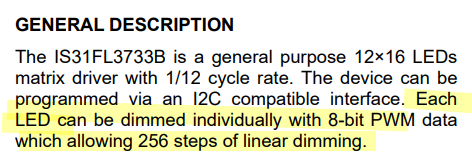
What this is telling us is that we can change the brightness of each character on our LED display, and that each character can be set to 256 different brightness levels!
This means we can do some cool fading effects by varying the brightness. In fact you might have noticed something similar when the ‘Beast first boots. The fact that the firmware is already doing this might lead you to hope that perhaps there’s a BIOS routine we can call to do the heavy lifting for us, and your faith is rewarded:
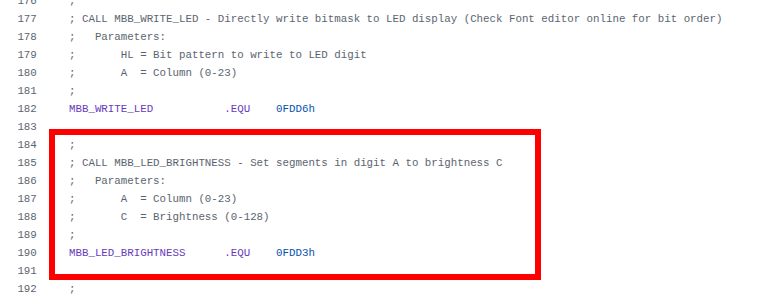
I’ve left the familiar MBB_WRITE_LED code on there for reference. This time we’re interested in MBB_LED_BRIGHTNESS, and we can see that the address this resolves to (0FDD3h) is different from MBB_WRITE_LED (0FDD6h), and moreover this time the column is passed in the A register as before, but this time brightness is passed in the C register. (Note that the comment in the firmware header is wrong; there are actually 256 brightness levels, not 128.)
All of which means we’re going to need another machine code stub to be able to call this routine.
The rough plan is, we’ll send lovely shimmering waves of varying brightness along our text string as it’s scrolling. In order to pull this off, we’ll construct a lookup table where we’ve pre-computed brightness levels so that they follow a sine wave pattern, like this:
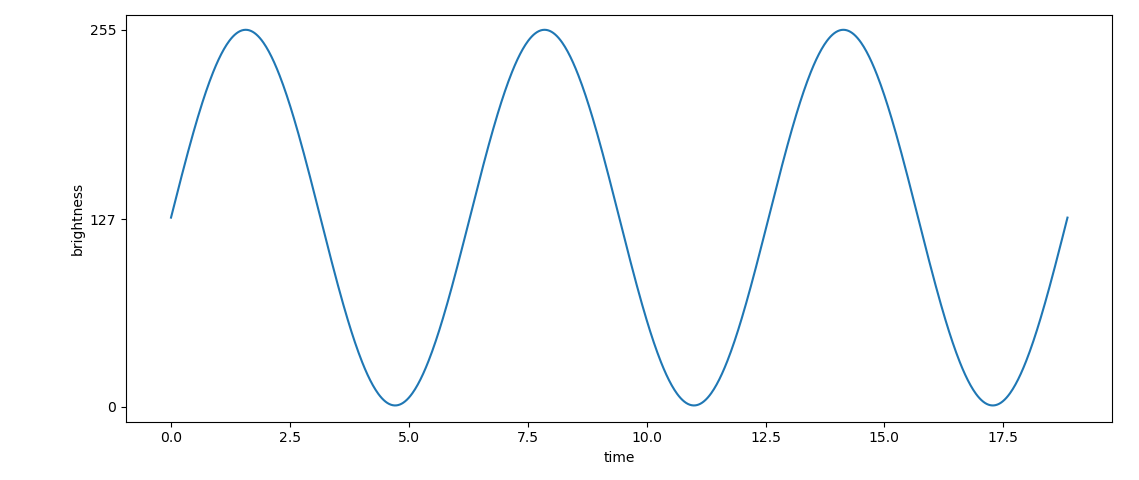
We could generate this lookup table in BASIC using the SIN() function, but it’s a little awkward and frankly a lot easier to generate the values and cast them to integer values in the correct range using a python script on a modern PC, so that’s exactly what I did.
Here’s the code we’ll be running this time:
1
2
3
4
5
6
7
8
9
10
11
12
13
14
15
16
17
18
19
20
21
22
23
24
25
26
27
28
29
30
31
32
33
34
35
36
37
38
39
40
41
42
43
44
45
46
47
48
49
50
51
52
53
54
55
56
57
58
59
60
61
62
63
64
65
66
67
68
69
70
71
72
73
74
75
76
77
78
79
80
81
82
83
84
85
86
87
88
89
90
91
92
93
94
95
96
97

10 REM === MicroBeast LED Demo - Step 5: Sine Wave Brightness ===
20 REM Scrolling text with a sine-wave brightness effect.
30 REM The brightness wave scrolls independently of the text.
40 REM
50 REM --- Machine code stub for MBB_WRITE_LED at 60000 (&HEA60) ---
60 REM CALL S%(BM%, C%) passes HL=&bitmask, DE=&column
70 S% = &HEA60
80 FOR I% = 0 TO 10: READ V%: POKE S%+I%, V%: NEXT I%
90 REM
100 REM --- Machine code stub for MBB_LED_BRIGHTNESS at 60011 (&HEA6B) ---
110 REM CALL B%(BR%, C%) passes HL=&brightness, DE=&column
120 REM   EX DE,HL / LD A,(HL) / EX DE,HL / LD C,(HL) / CALL &HFDD3 / RET
130 B% = &HEA6B
140 FOR I% = 0 TO 7: READ V%: POKE B%+I%, V%: NEXT I%
350 REM
360 REM --- Read font data into array (ASCII 32-126) ---
370 DIM FT%(94)
380 FOR I% = 0 TO 94: READ FT%(I%): NEXT I%
390 REM
400 REM --- Read sine table (64 entries, values 0-128) ---
410 DIM SN%(63)
420 FOR I% = 0 TO 63: READ SN%(I%): NEXT I%
430 REM
440 REM --- Get user input ---
450 INPUT "Enter scroll text: ", T$
470 REM
480 REM --- Build padded buffer ---
490 P$ = "                        ": REM 24 spaces
500 B$ = P$ + T$ + P$
510 BL% = LEN(B$)
520 REM
530 REM --- Main loop ---
540 PRINT "Scrolling with effects... press Ctrl-C to stop"
550 OF% = 1: REM text scroll offset (1-based)
560 BO% = 0: REM brightness wave offset
570 FC% = 0: REM frame counter
580 REM
590 REM --- Paint characters (only when text offset changes) ---
600 FOR C% = 0 TO 23
610   CH$ = MID$(B$, OF% + C%, 1)
620   IX% = ASC(CH$) - 32
630   IF IX% < 0 OR IX% > 94 THEN IX% = 0
640   BM% = FT%(IX%)
650   CALL S%(BM%, C%)
660 NEXT C%
670 REM
680 REM --- Brightness loop (runs every tick) ---
690 FOR C% = 0 TO 23
700   SI% = (C% + BO%) AND 63
710   BR% = SN%(SI%)
720   CALL B%(BR%, C%)
730 NEXT C%
740 REM
750 REM --- Advance brightness every tick, text every 4th tick ---
760 BO% = (BO% + 1) AND 63
770 FC% = (FC% + 1) AND 3
780 IF FC% <> 0 THEN 690
790 OF% = OF% + 1
800 IF OF% > BL% - 23 THEN OF% = 1
810 GOTO 600
840 REM
845 REM --- MBB_WRITE_LED stub (11 bytes) ---
846 DATA &HEB, &H7E, &HEB, &H5E, &H23, &H56, &HEB, &HCD, &HD6, &HFD, &HC9
847 REM
848 REM --- MBB_LED_BRIGHTNESS stub (8 bytes) ---
849 DATA &HEB, &H7E, &HEB, &H4E, &HCD, &HD3, &HFD, &HC9
850 REM
851 REM --- Font DATA (ASCII 32-126, 95 entries) ---
860 DATA &H0000, &H4900, &H0202, &H12CE, &H12ED, &H2DE4
870 DATA &H0B59, &H0200, &H0C00, &H2100, &H3FC0, &H12C0
880 DATA &H2000, &H00C0, &H4000, &H2400
890 DATA &H243F, &H0406, &H00DB, &H008F, &H00E6, &H0869
900 DATA &H00FD, &H1401, &H00FF, &H00EF, &H0040, &H2200
910 DATA &H0C40, &H00C8, &H2180, &H5083
920 DATA &H02BB, &H00F7, &H128F, &H0039, &H120F, &H0079
930 DATA &H0071, &H00BD, &H00F6, &H1209, &H001E, &H0C70
940 DATA &H0038, &H0536, &H0936, &H003F
950 DATA &H00F3, &H083F, &H08F3, &H00ED, &H1201, &H003E
960 DATA &H2430, &H2836, &H2D00, &H00EE, &H2409
970 DATA &H0039, &H0900, &H000F, &H2800, &H0008
980 DATA &H0100, &H208C, &H0878, &H00D8, &H208E, &H2058
990 DATA &H14C0, &H048E, &H1070, &H1000, &H2210
1000 DATA &H1E00, &H1200, &H10D4, &H1050, &H00DC
1010 DATA &H0170, &H0486, &H0050, &H0888, &H0078
1020 DATA &H001C, &H2010, &H2814, &H2D00, &H028E
1030 DATA &H2048, &H2149, &H1200, &H0C89, &H24C0
1040 REM
1050 REM --- Sine table (64 entries, values 0-255) ---
1060 DATA &H0080, &H008C, &H0098, &H00A5, &H00B0, &H00BC, &H00C6, &H00D0
1070 DATA &H00DA, &H00E2, &H00EA, &H00F0, &H00F5, &H00FA, &H00FD, &H00FE
1080 DATA &H00FF, &H00FE, &H00FD, &H00FA, &H00F5, &H00F0, &H00EA, &H00E2
1090 DATA &H00DA, &H00D0, &H00C6, &H00BC, &H00B0, &H00A5, &H0098, &H008C
1100 DATA &H0080, &H0073, &H0067, &H005A, &H004F, &H0043, &H0039, &H002F
1110 DATA &H0025, &H001D, &H0015, &H000F, &H000A, &H0005, &H0002, &H0001
1120 DATA &H0000, &H0001, &H0002, &H0005, &H000A, &H000F, &H0015, &H001D
1130 DATA &H0025, &H002F, &H0039, &H0043, &H004F, &H005A, &H0067, &H0073
Now you can see that we’ve got two machine code stubs (one for displaying characters and one for setting brightness) and also two lookup tables now (one for the “font” and one for our sine-wave of brightness values).
Our character display loop (which starts at line 600) has changed quite a bit. It starts out as before, then at line 680 we have:
1
2
3
4
5
6
7
680 REM --- Brightness loop (runs every tick) ---
690 FOR C% = 0 TO 23
700   SI% = (C% + BO%) AND 63
710   BR% = SN%(SI%)
720   CALL B%(BR%, C%)
730 NEXT C%
This goes through every column again, setting a suitable brightness value.
After that, we have this bit of chicanery:
1
2
3
4
5
6
750 REM --- Advance brightness every tick, text every 4th tick ---
760 BO% = (BO% + 1) AND 63
770 FC% = (FC% + 1) AND 3
780 IF FC% <> 0 THEN 690
790 OF% = OF% + 1
800 IF OF% > BL% - 23 THEN OF% = 1
What this is doing is incrementing both the brightness offset and the frame counter. When we increment the brightness offset, we AND 63 - this means that we keep only the bottom 6 bits of FC% so the effect is that whenever its value is 63 and we implement it, it wraps around to zero again.
This kind of modulo arithmetic with numbers that are a power of 2 is very, very common particularly in low level code like C or assembly language. The reason it’s so ubiquitous is that a lot of maths operations in base 2 (binary) can easily be implemented with simple (and fast!) logic instructions that execute directly on the processor, like the AND we just saw. The alternative would be to do actual division and find the remainder, which is incredibly slow and tedious on old hardware like the z80. The z80 doesn’t have a DIVIDE instruction, you’d have to write your own division routine.
We could of course use division in BASIC, but we’ll come to why that’s not such a great idea in a moment.
Running the code
This should be second nature by now:
- Boot your ‘Beast
- SLIDE the
EFFECTS.BASfile from the repo across to your ‘Beast’s B drive - “log in” to the A drive with
A: - start MBasic with
MBASIC - type
LOAD "EFFECTS" - inspect it with
LIST - run it with
RUN
All being well, you should see this (your string might be different):
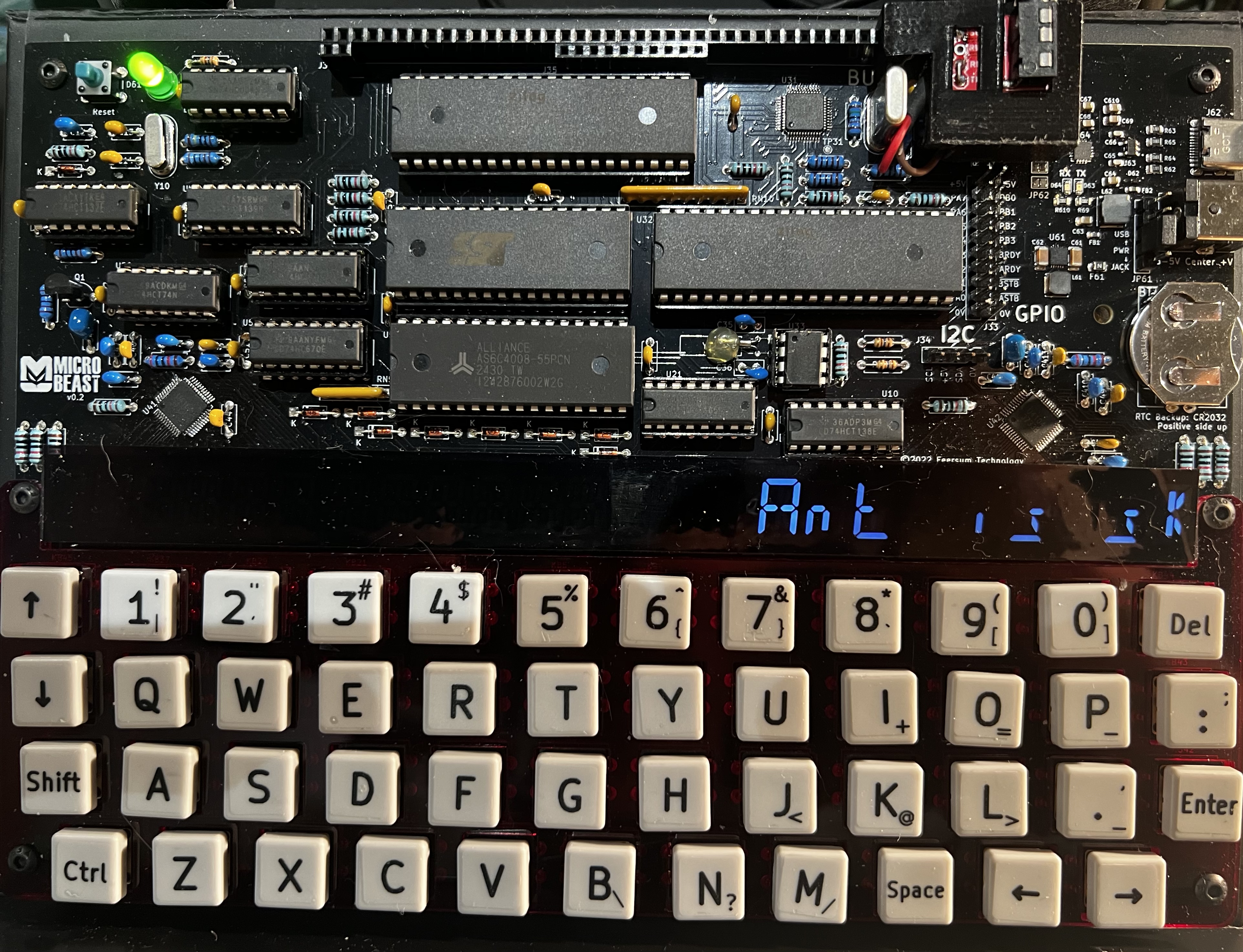
One thing you’ll notice straight away is that it is monumentally slow. There’s not even an artificial delay loop in there that we can tweak - this is running at full tilt! The sad truth is that while high-level languages like BASIC are great for learning how to code and writing simple programs, they squander a lot of the machine’s power turning those fancy BASIC statements into machine code that the processor can execute.
To get more performance out of the processor (and believe me, it can go a lot faster!) we’ll have to put aside BASIC, and like the bedroom-based game developers of yore teach ourselves z80 assembler..
Things you can try
- Can you see any way to make the BASIC code quicker?
- Try making the brightness wave go in the opposite direction!
- It’s not possible for the eye to actually discern 256 levels of brightness: how can you adjust the sine wave table so that the effect is more striking?
End of Part Six
That’s it for Part Six, and also for MBasic! The good ship Microsoft has taken us as far as she can. In the next part we’ll learn some z80 assembler, by re-implementing the programs we’ve already written.
If you’re not quite ready for that yet and want to experiment a bit further in BASIC then by all means do so: experimentation is the best way to learn! I’d recommend upgrading from MBasic to BBC BASIC - it has mostly the same syntax but introduces a lot of features that make life a lot easier like multi-line IF statements and PROCedures. It’s easier to call machine code in BBC BASIC too, and it has an excellent built-in assembler which you could use for the forthcoming articles if you wanted to.
If you want to dabble in other high-level languages you are spoilt for choice…there are CP/M implementations of Algol, COBOL, Fortran, Pascal, LISP, Forth, and C, and probably many more besides. These are easily found on the web, and most will run on the ‘Beast without issue (just make sure it’s the z80 + cp/m 2.2 version you’re trying to run.
Well done for making it this far - the real fun is about to begin!