Your name in lights! (Part 9)
Last time, we sort out font decoding and managed to display some basic strings based on user input.
This time, we’re going to get the rudimentary scrolltext working, building on the stuff we’ve already looked at.
To move forward, I’m going to assume that you’ve got SLIDE.COM on the B: drive of your ‘Beast, and that you have the corresponding PC utility installed somewhere in your PATH on your development PC. Refer to the SLIDE README if you need more help with that.
Set up
First things first: clone the Beast User repository on to your development PC.
We’re going to start in the scrolltext/assembler/scrolltext folder.
Background info
Just like the previous example, we’re going prompt the user for the string, decode the characters of that string into font symbols, and display them on the screen - but this time they’ll be scrolling!
Here’s the code:
1
2
3
4
5
6
7
8
9
10
11
12
13
14
15
16
17
18
19
20
21
22
23
24
25
26
27
28
29
30
31
32
33
34
35
36
37
38
39
40
41
42
43
44
45
46
47
48
49
50
51
52
53
54
55
56
57
58
59
60
61
62
63
64
65
66
67
68
69
70
71
72
73
74
75
76
77
78
79
80
81
82
83
84
85
86
87
88
89
90
91
92
93
94
95
96
97
98
99
100
101
102
103
104
105
106
107
108
109
110
111
112
113
114
115
116
117
118
119
120
121
122
123
124
125
126
127
128
129
130
131
132
133
134
135
136
137
138
139
140
141
142
143
144
145
146
147
148
149
150
151
152
153
154
155
156
157
158
159
160
161
162
163
164
165
166
167
168
169
170
; MicroBeast LED Demo - Step 4: Scrolling Text
; Scroll user-input text continuously across the 24-character LED display.
; Text is padded with 24 spaces on each side so it scrolls in and out.
;
; Build: sjasmplus --raw=scrolltext.com scrolltext.asm
; Run:   scrolltext.com under CP/M on MicroBeast
;

            ORG     0x100

            INCLUDE "../bios.inc"

; --- Print prompt ---
            LD      DE, prompt
            LD      C, C_WRITESTR
            CALL    BDOS

; --- Read user input ---
            LD      DE, inbuf
            LD      C, C_READSTR
            CALL    BDOS

            LD      DE, crlf
            LD      C, C_WRITESTR
            CALL    BDOS

; --- Build padded buffer: 24 spaces + text + 24 spaces ---
            ; Fill padbuf with 303 spaces (24 + 255 + 24)
            LD      HL, padbuf
            LD      BC, 303
            LD      A, ' '
clrbuf:
            LD      (HL), A
            INC     HL
            DEC     BC
            LD      A, B
            OR      C
            LD      A, ' '
            JR      NZ, clrbuf

            ; Copy user text into padbuf+24
            LD      A, (inbuf+1)   ; string length
            OR      A
            JR      Z, startscroll ; empty string, just scroll blanks
            LD      B, A           ; B = length (max 255)
            LD      HL, inbuf+2    ; source
            LD      DE, padbuf+24  ; destination (after 24 spaces)
copytxt:
            LD      A, (HL)
            LD      (DE), A
            INC     HL
            INC     DE
            DJNZ    copytxt

; Calculate number of scroll positions: textlen + 25 (16-bit)
startscroll:
            LD      A, (inbuf+1)
            LD      L, A
            LD      H, 0
            LD      BC, 25         ; + 24 + 1
            ADD     HL, BC
            LD      (buflen), HL

            LD      DE, scrollmsg
            LD      C, C_WRITESTR
            CALL    BDOS

; --- Main scroll loop ---
            LD      HL, 0
            LD      (scrollpos), HL

scrollloop:
; --- Display 24 characters from current scroll position ---
            LD      HL, (scrollpos)
            LD      DE, padbuf
            ADD     HL, DE         ; HL = start of visible window
            LD      (winptr), HL

            LD      C, 0           ; C = column counter (0-23)
disploop:
            LD      A, C
            CP      24
            JR      Z, dispdone

            ; Get character at window position
            LD      HL, (winptr)
            LD      E, C
            LD      D, 0
            ADD     HL, DE
            LD      A, (HL)        ; A = character

            ; Font lookup
            SUB     0x20
            CP      95
            JR      C, validchar
            XOR     A              ; invalid -> space (index 0)
validchar:
            ADD     A, A           ; * 2
            LD      E, A
            LD      D, 0
            LD      HL, font
            ADD     HL, DE
            LD      A, (HL)
            INC     HL
            LD      H, (HL)
            LD      L, A           ; HL = bitmask

            LD      A, C           ; column
            PUSH    BC             ; preserve C=column across BIOS call
            CALL    MBB_WRITE_LED
            POP     BC

            INC     C
            JR      disploop

dispdone:
; --- Delay loop for scroll speed ---
            LD      HL, DELAY_COUNT
delay:
            DEC     HL
            LD      A, H
            OR      L
            JR      NZ, delay

; --- Check for keypress (BDOS function 11 = console status) ---
            LD      C, 11
            CALL    BDOS
            OR      A
            JR      NZ, exit       ; key pressed, exit

; --- Advance scroll position (16-bit) ---
            LD      HL, (scrollpos)
            INC     HL
            LD      DE, (buflen)
            OR      A              ; clear carry
            SBC     HL, DE         ; scrollpos - buflen
            JR      C, nowrap      ; if scrollpos < buflen, keep it
            LD      HL, 0          ; wrap to start
            JR      savescroll
nowrap:
            ADD     HL, DE         ; restore: HL = scrollpos (undo the SBC)
savescroll:
            LD      (scrollpos), HL
            JR      scrollloop

exit:
            ; Read the key to clear it
            LD      C, 1
            CALL    BDOS
            JP      P_TERMCPM

; --- Constants ---
DELAY_COUNT EQU     0x8000          ; tune this for scroll speed

; --- Data ---
prompt:     DB      'Enter scroll text: $'
scrollmsg:  DB      'Scrolling... press any key to stop', 13, 10, '$'
crlf:       DB      13, 10, '$'

inbuf:      DB      255            ; max chars
            DB      0              ; chars read
            DS      256            ; input buffer (+1 for CR terminator)

scrollpos:  DW      0              ; current scroll offset (16-bit)
buflen:     DW      0              ; number of scroll positions (16-bit)
winptr:     DW      0              ; pointer to current window start

padbuf:     DS      303            ; 24 + 255 + 24

            INCLUDE "../font.asm"
That’s quite a chunky bit of code now. This is quite common with assembly code: it takes a lot of lines to achieve even the simplest task, but remember that each line gets assembled into just one, two or three bytes.
Set up and user string input is exactly the same as before. So is font decoding and character display. There are a couple of bits of extra house keeping that we’ve added:
1
2
3
4
5
6
7
8
9
10
11
12
            ; Fill padbuf with 303 spaces (24 + 255 + 24)
            LD      HL, padbuf
            LD      BC, 303
            LD      A, ' '
clrbuf:
            LD      (HL), A
            INC     HL
            DEC     BC
            LD      A, B
            OR      C
            LD      A, ' '
            JR      NZ, clrbuf
First off, we’re using a fixed buffer that’s the size of the maximum length of the user string (255 characters) plus one displaysworth of characters (24) on the front, and another at the end. We’ll fill the whole thing with blank SPACE characters. We set BC to this length (303), set HL to the beginning of the buffer, and write a SPACE character to it. Then we increment HL, decrement BC and check if it reached zero yet. The sequence LD A, B: OR C: JR NZ ... is a common idiom for checking if a 16-bit register pair is equal to zero (if BC is zero then B is zero and C is zero so “B OR B” must be zero).
Next we plonk the user’s string at character 25 onwards:
1
2
3
4
5
6
7
8
9
10
11
12
13
14
            ; Copy user text into padbuf+24
            LD      A, (inbuf+1)   ; string length
            OR      A
            JR      Z, startscroll ; empty string, just scroll blanks
            LD      B, A           ; B = length (max 255)
            LD      HL, inbuf+2    ; source
            LD      DE, padbuf+24  ; destination (after 24 spaces)
copytxt:
            LD      A, (HL)
            LD      (DE), A
            INC     HL
            INC     DE
            DJNZ    copytxt
You should be able to follow along here, except maybe OR A which is another very common idiom for “is A equal to zero?” - because if it is, the Z (zero) flag will be set. People use this idiom because it can be encoded in a single byte and takes only 4 T-states to execute, whereas the nearest equivalent CP 0 takes two bytes to encode and 7 T-states to execute. Incidentally, the OR A does technically modify A, but any number OR’d with itself is the same as the original number, so the effect is ephemeral. This is why it’s safe to LD B,A after the OR instruction.
We keep the string length (the number of characters that we need to copy) in the register B, because it allows us to use the special (and frankly magical) instruction DJNZ copytxt. DJNZ stands for decrement and jump if not zero - decrement B, if it’s not zero jump to copytxt, if it is zero continue with the immediately following instruction. The Z80 has a number of block data transfer operations like this that are significantly faster than the equivalent code you might write longhand. You’ll encounter on your journey (most likely LDIR first) - it really was very advanced for the time.
The main scrollloop is a fairly straightforward affair and is mostly code we’ve seen before. The only twist is that each time we display a string, we start from one character further to the right than last time.
Once we’ve finished a single display iteration, we delay:
1
2
3
4
5
6
7
8
dispdone:
; --- Delay loop for scroll speed ---
            LD      HL, DELAY_COUNT
delay:
            DEC     HL
            LD      A, H
            OR      L
            JR      NZ, delay
This is a busy loop delay: a fairly crude technique where we just have the CPU do absolutely nothing in a tight loop many thousands of times until we’ve delayed it sufficiently. There’s that OR L trick again, this time checking if the 16-bit HL register pair has hit zero.
One final bit of business:
1
2
3
4
5
; --- Check for keypress (BDOS function 11) ---
            LD      C, C_STAT
            CALL    BDOS
            OR      A
            JR      NZ, exit       ; key pressed, exit
Here we’re using another standard CP/M BIOS call C_STAT which returns non-zero in A id the user pressed a key. If they did, we exit cleanly and return to CP/M. We do this so that the user has a way to exit cleanly: if we didn’t the program would run forever, and the only way to stop it would be to reset the processor.
Note that if the user did press a key we are duty bound to read it:
1
2
3
4
5
6
exit:
            ; Read the key to clear it
            LD      C, C_READ
            CALL    BDOS
            JP      P_TERMCPM
C_READ is another standard BDOS function that reads the key value, which we simply discard.
Assembling the code
You can assemble the code manually with sjasmplus --raw=scroltxt.com scrolltext.asm and if all goes well you’ll produce a file scroltxt.com that you can run on your ‘Beast. Or add it to your script/Makefile if you went down that route.
Running the code
The procedure to run scroltxt.com on the ‘Beast is similar to what we’ve used before, but slightly shorter:
- Boot your ‘Beast
- SLIDE the
SCROLTXT.COMfile from the repo across to your ‘Beast’s B drive - while still logged-in to the
Bdrive, typeSCROLTXTand hit enter
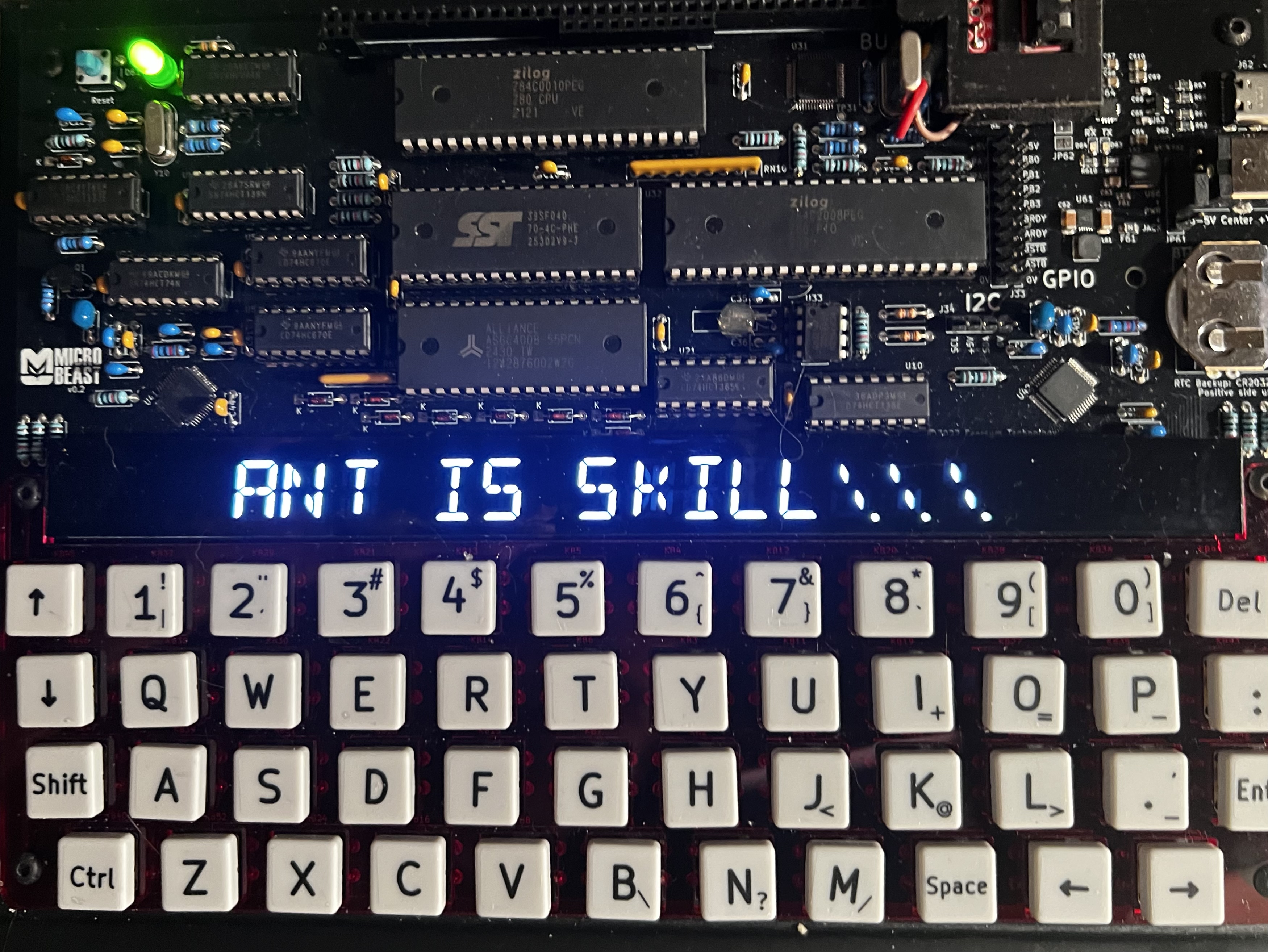
All being well, you should see this (your string might be different):
Things you can try
- Experiment with different delay values to see how fast it can go!
End of Part Nine
That’s it for Part Nine and our first stab at implementing a machine code scrolltext.
Next time we’ll look at adding the brightness wave, and hopefully its a bit more impressive than last time around!