Your name in lights! (Part 4)
Last time, we really got into our stride and managed to write short (very short!) messages of our choosing to the LED display.
We’re going to be building on that foundation here, so if you skipped earlier parts or are still a little shaky on the fundamentals you might want to go back and read them again.
To move forward, I’m going to assume that you’ve got SLIDE.COM on the B: drive of your ‘Beast, and that you have the corresponding PC utility installed somewhere in your PATH on your development PC. Refer to the SLIDE README if you need more help with that.
Set up
First things first: clone the Beast User repository on to your development PC.
We’re going to start in the scrolltext/basic/strings folder.
Background info
This time, we’ll modify the code we already have slightly to allow us to display longer messages, and to let us input the string we want to display dynamically, rather than hard-coding it into the source code.
Here’s the code we’ll be running this time:
1
2
3
4
5
6
7
8
9
10
11
12
13
14
15
16
17
18
19
20
21
22
23
24
25
26
27
28
29
30
31
32
33
34
35
36
37
38
39
40
41
42
43
44
45
46
47
48
49
50
51

10 REM === MicroBeast LED Demo - Step 3: String Display ===
20 REM Prompt user for a string and display it on the 24-char LED display.
30 REM Uses font lookup to convert each character to its 14-segment bitmask.
40 REM
50 REM --- Set up machine code stub at 60000 (&HEA60) ---
60 REM CALL S%(BM%, C%) passes HL=&bitmask, DE=&column
70 S% = &HEA60
80 FOR I% = 0 TO 10: READ V%: POKE S%+I%, V%: NEXT I%
110 REM
120 REM --- Read font data into array (ASCII 32-126) ---
130 DIM FT%(94)
140 FOR I% = 0 TO 94: READ FT%(I%): NEXT I%
150 REM
160 REM --- Get user input ---
170 INPUT "Enter text (max 24 chars): ", T$
180 IF LEN(T$) > 24 THEN T$ = LEFT$(T$, 24)
190 REM
200 REM --- Display string on LEDs ---
210 FOR C% = 0 TO 23
220   IF C% < LEN(T$) THEN IX% = ASC(MID$(T$, C%+1, 1)) - 32 ELSE IX% = 0
230   IF IX% < 0 OR IX% > 94 THEN IX% = 0
240   BM% = FT%(IX%)
250   CALL S%(BM%, C%)
260 NEXT C%
300 REM
310 PRINT "Done!"
320 END
330 REM
340 REM --- MBB_WRITE_LED stub (11 bytes) ---
350 DATA &HEB, &H7E, &HEB, &H5E, &H23, &H56, &HEB, &HCD, &HD6, &HFD, &HC9
360 REM
370 REM --- Font DATA (ASCII 32-126, 95 entries) ---
380 DATA &H0000, &H4900, &H0202, &H12CE, &H12ED, &H2DE4
390 DATA &H0B59, &H0200, &H0C00, &H2100, &H3FC0, &H12C0
400 DATA &H2000, &H00C0, &H4000, &H2400
410 DATA &H243F, &H0406, &H00DB, &H008F, &H00E6, &H0869
420 DATA &H00FD, &H1401, &H00FF, &H00EF, &H0040, &H2200
430 DATA &H0C40, &H00C8, &H2180, &H5083
440 DATA &H02BB, &H00F7, &H128F, &H0039, &H120F, &H0079
450 DATA &H0071, &H00BD, &H00F6, &H1209, &H001E, &H0C70
460 DATA &H0038, &H0536, &H0936, &H003F
470 DATA &H00F3, &H083F, &H08F3, &H00ED, &H1201, &H003E
480 DATA &H2430, &H2836, &H2D00, &H00EE, &H2409
490 DATA &H0039, &H0900, &H000F, &H2800, &H0008
500 DATA &H0100, &H208C, &H0878, &H00D8, &H208E, &H2058
510 DATA &H14C0, &H048E, &H1070, &H1000, &H2210
520 DATA &H1E00, &H1200, &H10D4, &H1050, &H00DC
530 DATA &H0170, &H0486, &H0050, &H0888, &H0078
540 DATA &H001C, &H2010, &H2814, &H2D00, &H028E
550 DATA &H2048, &H2149, &H1200, &H0C89, &H24C0
Much of this code should look familiar from last time. We’ve got the same machine-code stub to juggle registers and call our BIOS routine in lines 50-80, the same font table setup in lines 12-150, and the same (ish) character display routine in lines 200-260.
We’ve added some code in lines 170-180 to prompt the user for the string to be displayed:
1
2
3

170 INPUT "Enter text (max 24 chars): ", T$
180 IF LEN(T$) > 24 THEN T$ = LEFT$(T$, 24)
INPUT is the keyword that causes the prompt to be displayed, and whatever characters you provide are stored in the variable T$ (remember that $ means “string” here).
The second line is a safety check to ensure that our string is no longer than 24 characters, because that’s the maximum message size we can display on our 24-character LED display.
There’s also some extra chicanery in lines 220-230 that I glossed over earlier that we should now review:
1
2
220   IF C% < LEN(T$) THEN IX% = ASC(MID$(T$, C%+1, 1)) - 32 ELSE IX% = 0
230   IF IX% < 0 OR IX% > 94 THEN IX% = 0
C% is our integer “column number” variable counting up from 0 to 23 inclusive. For each column position we extract the relevant character from the string - that’s the MID$ keyword in the middle. We use ASC to get the ASCII character code for this character, and we subtract 32 from it, because we don’t have font table entries for the first 32 ASCII characters as they’re all control codes anyway. The first entry in our font table is the SPACE character, whose ASCII value is 32: so subtracting 32 is an easy way to convert from ASCII code to font-table index.
Line 220 is also guarding against our input string being shorter than the display width (IF C% < LEN(T$)) - if we run out of characters in T$ before we get to the end of the display we do ELSE IX% = 0 which has the effect of using entry 0 in our font table (a blank SPACE character).
Finally line 230 guards against tricksy character values that our outside the bounds of our font table: if that happens, we’ll swap those out for a SPACE character too.
Running the code
You know the drill:
- Boot your ‘Beast
- SLIDE the
STRINGS.BASfile from the repo across to your ‘Beast’s B drive - “log in” to the A drive with
A: - start MBasic with
MBASIC - type
LOAD "STRINGS" - inspect it with
LIST - run it with
RUN
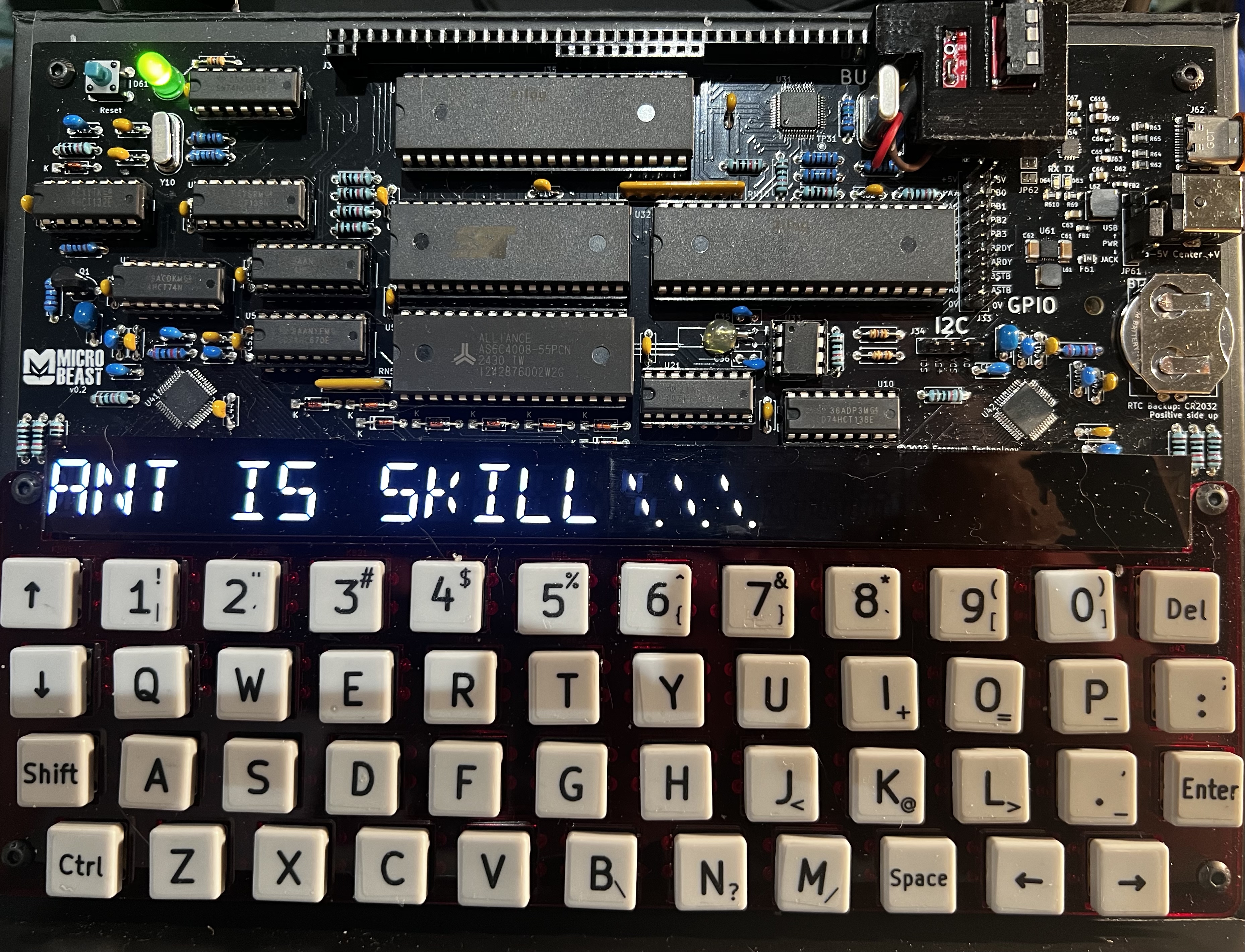
All being well, you should see this (your string might be different):
Things you can try
- Try displaying a string that’s longer than the display
- Try displaying characters that aren’t in the font table
- How could you adapt the code to display “User Defined Graphics” (UDGs) ? Are there are characters you can swap out in the existing font table?
- What about if you wanted to extend the existing font table to offer UDGs?
End of Part Four
That’s it for Part Four - another relatively short one. Next time, we’ll look at how we can display strings that are longer than the available display width, and introduce the ancient and venerable art of ScrollTexts…