Your name in lights! (Part 5)
Last time, we were able to display arbitrary short strings on the ‘Beast’s LED displays.
We’re going to be building on that foundation here, so if you skipped earlier parts or are still a little shaky on the fundamentals you might want to go back and read them again.
To move forward, I’m going to assume that you’ve got SLIDE.COM on the B: drive of your ‘Beast, and that you have the corresponding PC utility installed somewhere in your PATH on your development PC. Refer to the SLIDE README if you need more help with that.
Set up
First things first: clone the Beast User repository on to your development PC.
We’re going to start in the scrolltext/basic/scrolltext folder.
Background info
This time around, we’re going to add the ability to display strings that are longer than our display is wide (24 characters). And we’ll do that by making a “scroll text” - only a portion of the message is visible at a given time. By updating which portion we display ever so slightly on a regular basis, we can give the illusion of the text scrolling by.
Imagine for a moment, that you are wearing a welding helmet and contemplating God’s final message to his creation. You can’t see the whole message in one go, you’d have to physically turn your head to read it (or move the message of course, but it’s not so easy to move divine messages in 30 foot letters made of fire).

One way we could do this is to start by displaying our string at column 0, and then on the next iteration display it at column -1, then -2 etc. etc. The text would then appear to be moving to the left:

This sort of approach is common in many graphics systems, but the ‘Beast will not take kindly to negative column values. Also, it is not a very efficient technique: if the string is very long, we will spend a lot of time trying to render characters that cannot be visible.
A better approach is to slide the display along the string:

So we start by displaying the first 24 characters of the string starting at the first (index 0), but on the next iteration we display 24 characters starting from the second position in the string (index 1) and so on. We could do some complicated maths to deal with what happens when we get to the end of the string, but it’s easier to just stick 24 spaces on the end. In fact, we’ll stick another 24 on the front so the string appears to enter from the right hand edge.
Here’s the code we’ll be running this time:
1
2
3
4
5
6
7
8
9
10
11
12
13
14
15
16
17
18
19
20
21
22
23
24
25
26
27
28
29
30
31
32
33
34
35
36
37
38
39
40
41
42
43
44
45
46
47
48
49
50
51
52
53
54
55
56
57
58
59
60
61
62
63
64
65
66
67

10 REM === MicroBeast LED Demo - Step 4: Scrolling Text ===
20 REM Prompts for a string and scrolls it continuously across the
30 REM 24-character LED display. Padded with spaces so text scrolls
40 REM in from the right and out to the left.
50 REM
60 REM --- Set up machine code stub at 60000 (&HEA60) ---
70 REM CALL S%(BM%, C%) passes HL=&bitmask, DE=&column
80 S% = &HEA60
90 FOR I% = 0 TO 10: READ V%: POKE S%+I%, V%: NEXT I%
120 REM
130 REM --- Read font data into array (ASCII 32-126) ---
140 DIM FT%(94)
150 FOR I% = 0 TO 94: READ FT%(I%): NEXT I%
160 REM
170 REM --- Get user input ---
180 INPUT "Enter scroll text: ", T$
200 REM
210 REM --- Build padded buffer: 24 spaces + text + 24 spaces ---
220 P$ = "                        ": REM 24 spaces
230 B$ = P$ + T$ + P$
240 BL% = LEN(B$)
250 REM
260 REM --- Scroll loop ---
270 REM Total scroll positions = length of buffer - 23
280 PRINT "Scrolling... press Ctrl-C to stop"
290 OF% = 1: REM scroll offset (1-based for MID$)
300 REM
310 REM Display 24 characters starting at offset
320 FOR C% = 0 TO 23
330   CH$ = MID$(B$, OF% + C%, 1)
340   IX% = ASC(CH$) - 32
350   IF IX% < 0 OR IX% > 94 THEN IX% = 0
360   BM% = FT%(IX%)
370   CALL S%(BM%, C%)
380 NEXT C%
420 REM
430 REM --- Delay for scroll speed ---
440 FOR D% = 1 TO 200: NEXT D%
450 REM
460 REM --- Advance scroll position, wrap around ---
470 OF% = OF% + 1
480 IF OF% > BL% - 23 THEN OF% = 1
490 GOTO 310
500 REM
510 REM --- MBB_WRITE_LED stub (11 bytes) ---
520 DATA &HEB, &H7E, &HEB, &H5E, &H23, &H56, &HEB, &HCD, &HD6, &HFD, &HC9
530 REM
540 REM --- Font DATA (ASCII 32-126, 95 entries) ---
550 DATA &H0000, &H4900, &H0202, &H12CE, &H12ED, &H2DE4
560 DATA &H0B59, &H0200, &H0C00, &H2100, &H3FC0, &H12C0
570 DATA &H2000, &H00C0, &H4000, &H2400
580 DATA &H243F, &H0406, &H00DB, &H008F, &H00E6, &H0869
590 DATA &H00FD, &H1401, &H00FF, &H00EF, &H0040, &H2200
600 DATA &H0C40, &H00C8, &H2180, &H5083
610 DATA &H02BB, &H00F7, &H128F, &H0039, &H120F, &H0079
620 DATA &H0071, &H00BD, &H00F6, &H1209, &H001E, &H0C70
630 DATA &H0038, &H0536, &H0936, &H003F
640 DATA &H00F3, &H083F, &H08F3, &H00ED, &H1201, &H003E
650 DATA &H2430, &H2836, &H2D00, &H00EE, &H2409
660 DATA &H0039, &H0900, &H000F, &H2800, &H0008
670 DATA &H0100, &H208C, &H0878, &H00D8, &H208E, &H2058
680 DATA &H14C0, &H048E, &H1070, &H1000, &H2210
690 DATA &H1E00, &H1200, &H10D4, &H1050, &H00DC
700 DATA &H0170, &H0486, &H0050, &H0888, &H0078
710 DATA &H001C, &H2010, &H2814, &H2D00, &H028E
720 DATA &H2048, &H2149, &H1200, &H0C89, &H24C0
No surprises here. We’ve essentially got all the same code as last time, but now we’ve got a loop around our main display routine that changes the offset on each iteration: lines 460-490. The empty loop in line 440 is just there to slow things down a bit, lest the awesome power of Microsoft BASIC render our message an illegible blur.
Running the code
You know the drill:
- Boot your ‘Beast
- SLIDE the
SCROLLTEXT.BASfile from the repo across to your ‘Beast’s B drive (you’ll need to rename it asSCROLTXT.BASto fit the CP/M naming convention) - “log in” to the A drive with
A: - start MBasic with
MBASIC - type
LOAD "SCROLTXT" - inspect it with
LIST - run it with
RUN
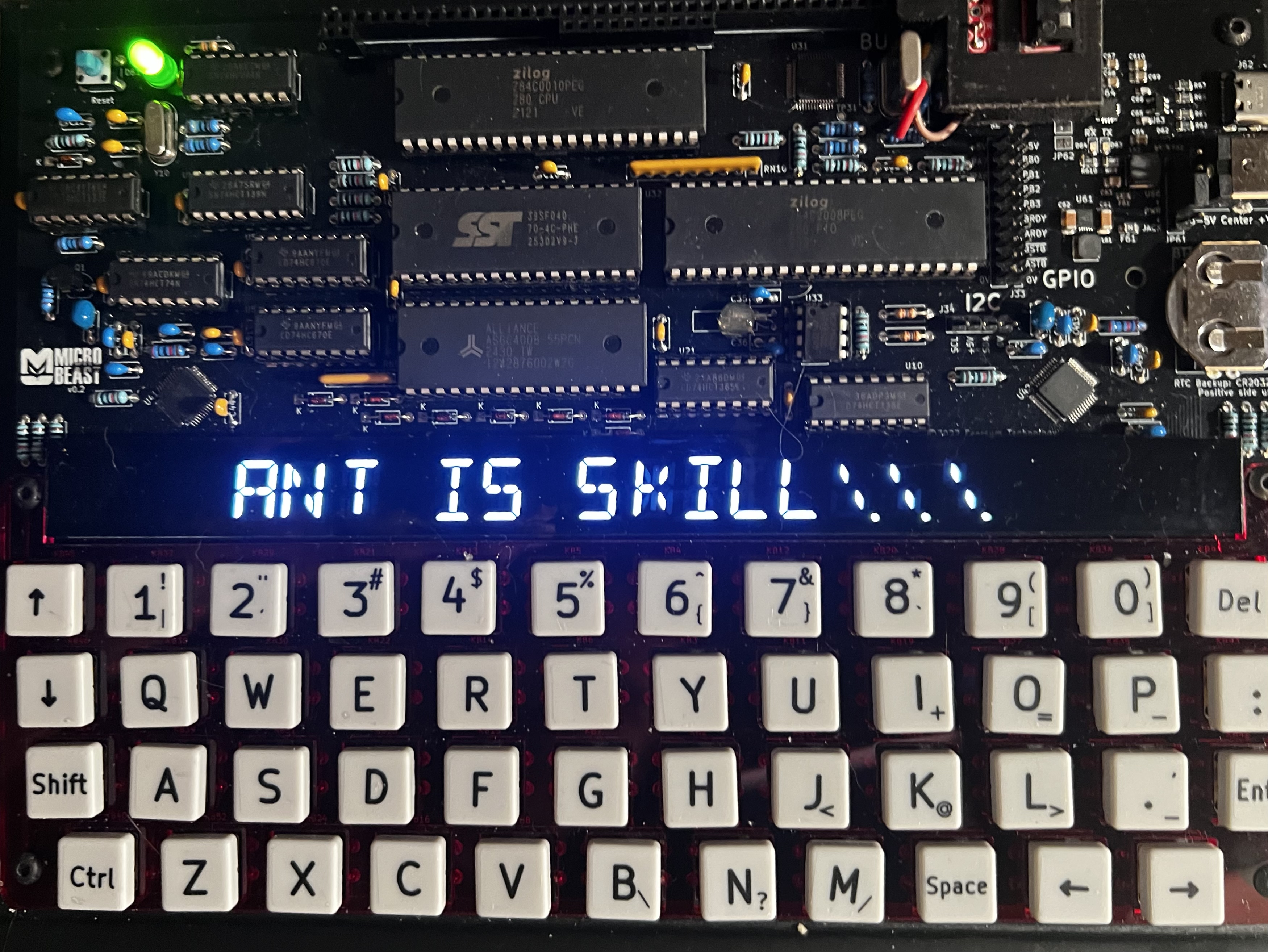
All being well, you should see this (your string might be different):
Things you can try
- Try making the delay shorter - what’s the fastest it can do?
- Try making the string scroll in the opposite direction!
End of Part Five
That’s it for Part Five - we built on all the understanding we’ve developed so far and built a reasonable scrolltext implementation. In the next part, we’ll wrap up the BASIC section by adding some effects to our scrolltext to make it extra fancy!