Your name in lights! (Part 8)
Last time, we got a grounding in the fundamentals of machine code programming and managed to turn some LEDs segments on.
This time around there’s a bit less theory and a bit more practical - in fact, it’s a double header! We’re going to cover the same ground as two of the earlier BASIC examples - such is the efficiency of machine code!
To move forward, I’m going to assume that you’ve got SLIDE.COM on the B: drive of your ‘Beast, and that you have the corresponding PC utility installed somewhere in your PATH on your development PC. Refer to the SLIDE README if you need more help with that.
Set up
First things first: clone the Beast User repository on to your development PC.
We’re going to start in the scrolltext/assembler/fonts folder and then move on to the scrolltext/assembler/strings folder.
Background info
Just like the earlier basic examples, we’re going to deal with the issue of font tables and encoding ASCII values to bitmaps, and then we’ll go on to displaying a user-entered string on the LEDs.
Font encoding
Without further ado, let’s have a look at the code for doing ASCII to bitmap conversion:
1
2
3
4
5
6
7
8
9
10
11
12
13
14
15
16
17
18
19
20
21
22
23
24
25
26
27
28
29
30
31
32
33
34
35
36
37
38
39
40
41
42
43
44
45
46
47
48
49
50
51
52
53
54
55
56
57
58
59
60
61
62
63
64
65
66
67
68
69
70
71
72
73
74
75
76
77
78
79
80
81
82
83
84
85
86
87
88
89
90
91
92
93
94
95
96
97

;
; MicroBeast LED Demo - Step 2: Font Rendering
; Display "HELLO" on the last 5 LED positions (columns 19-23)
; using the font table to look up 14-segment bitmasks.
;
; Build: sjasmplus --raw=fonts.com fonts.asm
; Run:   fonts.com under CP/M on MicroBeast
;

            ORG     0x100

            INCLUDE "../bios.inc"

; --- Display "HELLO" on columns 19-23 ---
; For each character:
;   1. Get ASCII code
;   2. Subtract 0x20 (space) to get font table index
;   3. Multiply by 2 (each entry is a 16-bit word)
;   4. Add font table base address
;   5. Load 16-bit bitmask from table into HL
;   6. Set A = column number
;   7. Call MBB_WRITE_LED

            ; 'H' = 0x48, column 19
            LD      A, 'H' - 0x20   ; font index for 'H'
            ADD     A, A            ; multiply by 2 (word size)
            LD      E, A
            LD      D, 0
            LD      HL, font
            ADD     HL, DE          ; HL = address of bitmask for 'H'
            LD      A, (HL)
            INC     HL
            LD      H, (HL)
            LD      L, A            ; HL = bitmask
            LD      A, 19           ; column 19
            CALL    MBB_WRITE_LED

            ; 'E' = 0x45, column 20
            LD      A, 'E' - 0x20
            ADD     A, A
            LD      E, A
            LD      D, 0
            LD      HL, font
            ADD     HL, DE
            LD      A, (HL)
            INC     HL
            LD      H, (HL)
            LD      L, A
            LD      A, 20
            CALL    MBB_WRITE_LED

            ; 'L' = 0x4C, column 21
            LD      A, 'L' - 0x20
            ADD     A, A
            LD      E, A
            LD      D, 0
            LD      HL, font
            ADD     HL, DE
            LD      A, (HL)
            INC     HL
            LD      H, (HL)
            LD      L, A
            LD      A, 21
            CALL    MBB_WRITE_LED

            ; 'L' = 0x4C, column 22
            LD      A, 'L' - 0x20
            ADD     A, A
            LD      E, A
            LD      D, 0
            LD      HL, font
            ADD     HL, DE
            LD      A, (HL)
            INC     HL
            LD      H, (HL)
            LD      L, A
            LD      A, 22
            CALL    MBB_WRITE_LED

            ; 'O' = 0x4F, column 23
            LD      A, 'O' - 0x20
            ADD     A, A
            LD      E, A
            LD      D, 0
            LD      HL, font
            ADD     HL, DE
            LD      A, (HL)
            INC     HL
            LD      H, (HL)
            LD      L, A
            LD      A, 23
            CALL    MBB_WRITE_LED

            JP      P_TERMCPM

            INCLUDE "../font.asm"
Quite a bit more to get our heads around this time! But don’t be alarmed by the length: there are five near-identical blocks of code here, one to display each of the letters in ‘H’, ‘E’, ‘L’, ‘L’ and ‘O’. This is called loop unrolling - instead of looping around some common code 5 times with slightly different inputs, we unrolled the loop into 5 ever so slightly different steps. It’s usually done for speed/efficiency, but here it’s just for pedagogic reasons. There’s one more file I need to show you, and that’s the included font.asm table:
1
2
3
4
5
6
7
8
9
10
11
12
13
14
15
16
17
18
19
20
21
22
23
24
25
26
27
28
29
30
31
32
33
34
35
36
37
38
39
40
41
42
43
44
45
46
47
48
49
50
51
52
53
54
55
56
57
58
59
60
61
62
63
64
65
66
67
68
69
70
71
72
73
74
75
76
77
78
79
80
81
82
83
84
85
86
87
88
89
90
91
92
93
94
95
96
97
98
99
100
101
102
103
104
105
106
107
108
109
110
111
112
113
114
115
116
117
118
119
120
121
122
123
124
125
126
127
128
129
130
131
132
133
134
135
136
137
138
139
140
141
142
143

;
; Font definition for MicroBeast 14-segment LED displays
;
; Extracted from the MicroBeast firmware repository:
; https://github.com/atoone/MicroBeast/blob/main/firmware/font.asm
;
; Copyright (c) 2023 Andy Toone for Feersum Technology Ltd.
;
; Part of the MicroBeast Z80 kit computer project. Support hobby electronics.
;
; Permission is hereby granted, free of charge, to any person obtaining a copy
; of this software and associated documentation files (the "Software"), to deal
; in the Software without restriction, including without limitation the rights
; to use, copy, modify, merge, publish, distribute, sublicense, and/or sell
; copies of the Software, and to permit persons to whom the Software is
; furnished to do so, subject to the following conditions:
;
; The above copyright notice and this permission notice shall be included in all
; copies or substantial portions of the Software.
;
; THE SOFTWARE IS PROVIDED "AS IS", WITHOUT WARRANTY OF ANY KIND, EXPRESS OR
; IMPLIED, INCLUDING BUT NOT LIMITED TO THE WARRANTIES OF MERCHANTABILITY,
; FITNESS FOR A PARTICULAR PURPOSE AND NONINFRINGEMENT. IN NO EVENT SHALL THE
; AUTHORS OR COPYRIGHT HOLDERS BE LIABLE FOR ANY CLAIM, DAMAGES OR OTHER
; LIABILITY, WHETHER IN AN ACTION OF CONTRACT, TORT OR OTHERWISE, ARISING FROM,
; OUT OF OR IN CONNECTION WITH THE SOFTWARE OR THE USE OR OTHER DEALINGS IN THE
; SOFTWARE.
;
; Font table: 16-bit bitmask per character, indexed by ASCII code.
; To look up a character:
;   1. Subtract 0x20 (space) from ASCII code
;   2. Multiply by 2 (each entry is a 16-bit word)
;   3. Add to font base address
;   4. Read 16-bit word into HL (L=outer segments, H=inner/diagonal)
;
; Format: .dw value  ; where low byte = outer segments, high byte = inner segments
;

INVALID_CHAR_BITMASK    EQU 0x04861

font:
                    dw      0x0000   ; (space)
                    dw      0x4900   ; !
                    dw      0x0202   ; "
                    dw      0x12CE   ; #
                    dw      0x12ED   ; $
                    dw      0x2DE4   ; %
                    dw      0x0B59   ; &
                    dw      0x0200   ; '
                    dw      0x0C00   ; (
                    dw      0x2100   ; )
                    dw      0x3FC0   ; *
                    dw      0x12C0   ; +
                    dw      0x2000   ; ,
                    dw      0x00C0   ; -
                    dw      0x4000   ; .
                    dw      0x2400   ; /

                    dw      0x243F   ; 0
                    dw      0x0406   ; 1
                    dw      0x00DB   ; 2
                    dw      0x008F   ; 3
                    dw      0x00E6   ; 4
                    dw      0x0869   ; 5
                    dw      0x00FD   ; 6
                    dw      0x1401   ; 7
                    dw      0x00FF   ; 8
                    dw      0x00EF   ; 9
                    dw      0x0040   ; :
                    dw      0x2200   ; ;
                    dw      0x0C40   ; <
                    dw      0x00C8   ; =
                    dw      0x2180   ; >
                    dw      0x5083   ; ?

                    dw      0x02BB   ; @
                    dw      0x00F7   ; A
                    dw      0x128F   ; B
                    dw      0x0039   ; C
                    dw      0x120F   ; D
                    dw      0x0079   ; E
                    dw      0x0071   ; F
                    dw      0x00BD   ; G
                    dw      0x00F6   ; H
                    dw      0x1209   ; I
                    dw      0x001E   ; J
                    dw      0x0C70   ; K
                    dw      0x0038   ; L
                    dw      0x0536   ; M
                    dw      0x0936   ; N
                    dw      0x003F   ; O

                    dw      0x00F3   ; P
                    dw      0x083F   ; Q
                    dw      0x08F3   ; R
                    dw      0x00ED   ; S
                    dw      0x1201   ; T
                    dw      0x003E   ; U
                    dw      0x2430   ; V
                    dw      0x2836   ; W
                    dw      0x2D00   ; X
                    dw      0x00EE   ; Y
                    dw      0x2409   ; Z
                    dw      0x0039   ; [
                    dw      0x0900   ; backslash
                    dw      0x000F   ; ]
                    dw      0x2800   ; ^
                    dw      0x0008   ; _

                    dw      0x0100   ; `
                    dw      0x208C   ; a
                    dw      0x0878   ; b
                    dw      0x00D8   ; c
                    dw      0x208E   ; d
                    dw      0x2058   ; e
                    dw      0x14C0   ; f
                    dw      0x048E   ; g
                    dw      0x1070   ; h
                    dw      0x1000   ; i
                    dw      0x2210   ; j
                    dw      0x1E00   ; k
                    dw      0x1200   ; l
                    dw      0x10D4   ; m
                    dw      0x1050   ; n
                    dw      0x00DC   ; o

                    dw      0x0170   ; p
                    dw      0x0486   ; q
                    dw      0x0050   ; r
                    dw      0x0888   ; s
                    dw      0x0078   ; t
                    dw      0x001C   ; u
                    dw      0x2010   ; v
                    dw      0x2814   ; w
                    dw      0x2D00   ; x
                    dw      0x028E   ; y
                    dw      0x2048   ; z
                    dw      0x2149   ; {
                    dw      0x1200   ; |
                    dw      0x0C89   ; }
                    dw      0x24C0   ; ~
                    dw      0x0000   ; DEL
That probably looks quite familiar - it should do, I lifted it verbatim from the MicroBeast firmware, exactly like we did for the BASIC version, except this time I didn’t have to convert it into a number format that BASIC can work with. dw is another assembler directive, it means define word, i.e. insert the following 16-bit value directly in the code.
Now let’s look at the first character display code block:
1
2
3
4
5
6
7
8
9
10
11
12
13
14
            ; 'H' = 0x48, column 19
            LD      A, 'H' - 0x20   ; font index for 'H'
            ADD     A, A            ; multiply by 2 (word size)
            LD      E, A
            LD      D, 0
            LD      HL, font
            ADD     HL, DE          ; HL = address of bitmask for 'H'
            LD      A, (HL)
            INC     HL
            LD      H, (HL)
            LD      L, A            ; HL = bitmask
            LD      A, 19           ; column 19
            CALL    MBB_WRITE_LED
We load ‘H’ into the A register, then immediately subtract 32 (0x20) because we our font table starts at character 32 (space). We could have said LD A, 0x28, but getting the assembler to do simple arithmetic for us at assembly time is easy and has no penalty, and it makes it much clearer what’s going on.
Once we have that value, we add A to itself, which of course has the effect of doubling A. We’re doing this because we have an index into the 16-bit entries of the table (index 0 is word 0, index 1 is word 1, etc) but we need an index into the 8-bit bytes of the table, and OTHERWISEince there are two 8-bit bytes in a 16-bit word doubling gets us there (index 0 is byte 0, index 1 is byte 2 etc).
Now we copy A into E, and set D to zero. This has the effect that 16-bit register pair DE just contains our byte offset in its lower byte and nothing in its upper byte.
We set HL to point to our font table, and add DE to it. Now we have (in HL) a pointer to the first byte (the low byte) of our 16 bit symbol bitmask. We load that byte into A with LD A, (HL) (“load A from the address in HL”), then we increment HL and fetch the high byte into H. This means HL no longer points at our font table, but we don’t care because we’re done with it now anyway.
Finally we move A (low byte of symbol bitmask) into L. H already contained the high byte of our bitmask, so now HL contains the entire 16 bit symbol bitmask, with the bytes in the right order. Happily, this is exactly what the BIOS routine requires, the only extra thing we need is a column number in A, which we achieve with LD A, 19 before making the CALL MBB_WRITE_LED.
Then it’s simply a matter of repeating the whole shooting match for the other letters. Each time there’s a different initial ASCII value, and a different column number.
If you were paying attention last time, you may be wondering why we’re not bothing with PUSH BC and POP BC around the BIOS call to prevent clobbering. To be blunt: we don’t care. It doesn’t matter if the BIOS clobbers our registers, as we’re setting them up from first principles each time.
Assembling the code
You can assemble the code manually with sjasmplus --raw=fonts.com fonts.asm and if all goes well you’ll produce a file fonts.com that you can run on your ‘Beast. Or add it to your script/Makefile if you went down that route.
Running the code
The procedure to run fonts.com on the ‘Beast is similar to what we’ve used before, but slightly shorter:
- Boot your ‘Beast
- SLIDE the
FONTS.COMfile from the repo across to your ‘Beast’s B drive - while still logged-in to the
Bdrive, typeFONTSand hit enter
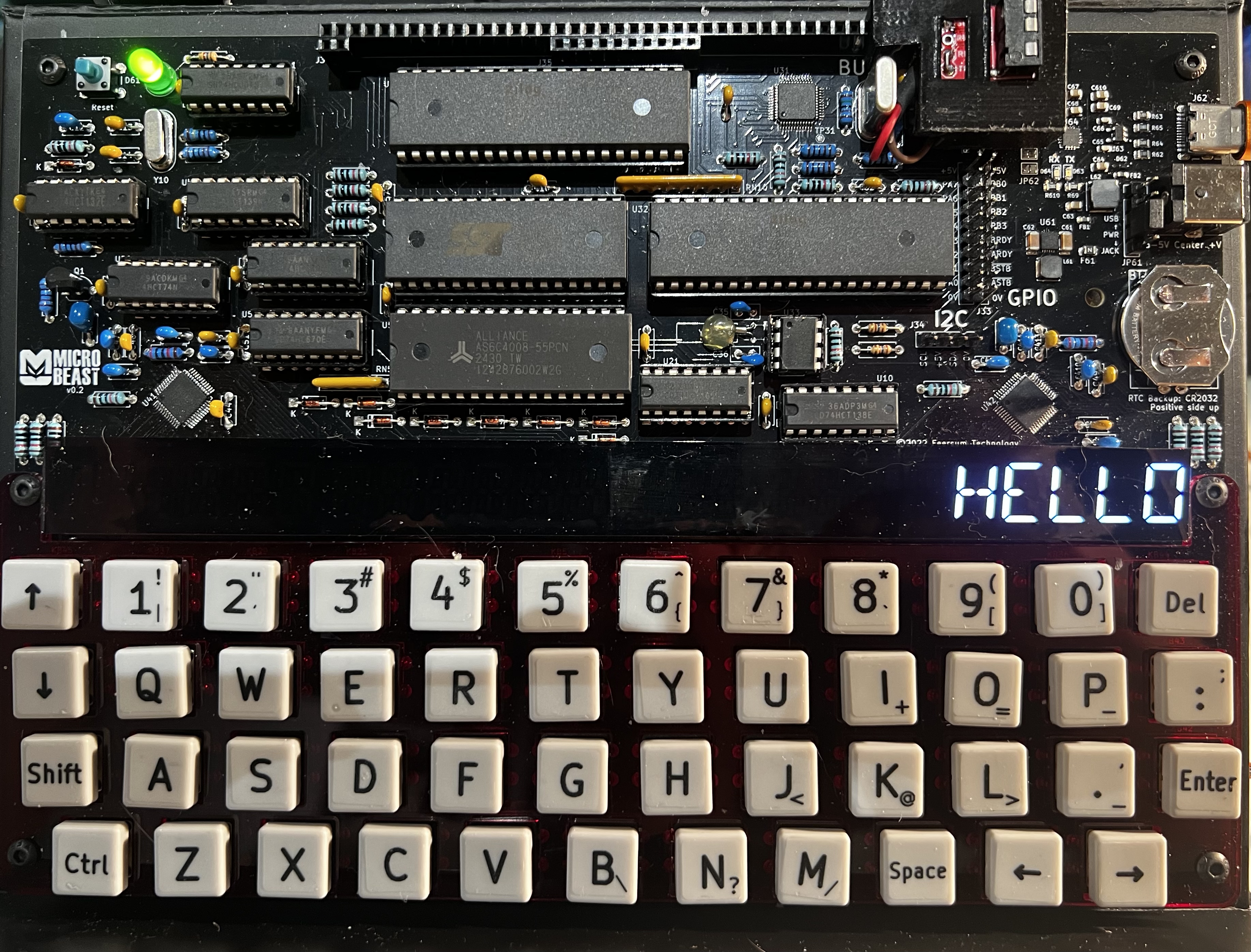
All being well, you should see this (your string might be different):
Things you can try
- Change the string that’s displayed
- Change where it’s displayed
- How would you go about replacing my gloriously decadent unrolled code with a loop? What precautions will you need to take?
String-u-like
Now lets turn our attention to strings.asm:
1
2
3
4
5
6
7
8
9
10
11
12
13
14
15
16
17
18
19
20
21
22
23
24
25
26
27
28
29
30
31
32
33
34
35
36
37
38
39
40
41
42
43
44
45
46
47
48
49
50
51
52
53
54
55
56
57
58
59
60
61
62
63
64
65
66
67
68
69
70
71
72
73
74
75
76
77
78
79
80
81
82
83
84
85
86
87
88
89
90

;
; MicroBeast LED Demo - Step 3: String Display
; Prompt the user for a string and display it on the 24-char LED display.
;
; Build: sjasmplus --raw=strings.com strings.asm
; Run:   strings.com under CP/M on MicroBeast
;

            ORG     0x100

            INCLUDE "../bios.inc"

; --- Print prompt ---
            LD      DE, prompt
            LD      C, C_WRITESTR
            CALL    BDOS

; --- Read user input via BDOS function 10 (buffered input) ---
; Buffer format: byte 0 = max chars, byte 1 = chars read, bytes 2+ = string
            LD      DE, inbuf
            LD      C, C_READSTR
            CALL    BDOS

; --- Print newline ---
            LD      DE, crlf
            LD      C, C_WRITESTR
            CALL    BDOS

; --- Display string on LEDs ---
            LD      A, (inbuf+1)   ; number of characters read
            LD      B, A           ; B = string length
            LD      C, 0           ; C = current column (0-23)

; Loop through all 24 columns
disploop:
            LD      A, C
            CP      24             ; done all columns?
            JR      Z, done

            ; Check if we still have characters to display
            LD      A, C
            CP      B              ; column >= string length?
            JR      NC, blank      ; yes, write blank

            ; Look up character in font table
            LD      HL, inbuf+2
            LD      E, C
            LD      D, 0
            ADD     HL, DE         ; HL = address of character
            LD      A, (HL)        ; A = ASCII character

            ; Font lookup: index = (ASCII - 0x20) * 2
            SUB     0x20
            CP      95             ; valid range? (0-94)
            JR      NC, blank      ; invalid char, show blank
            ADD     A, A           ; * 2
            LD      E, A
            LD      D, 0
            LD      HL, font
            ADD     HL, DE
            LD      A, (HL)
            INC     HL
            LD      H, (HL)
            LD      L, A           ; HL = bitmask
            JR      writled

blank:
            LD      HL, 0x0000      ; blank (all segments off)

writled:
            LD      A, C           ; column number
            PUSH    BC             ; preserve B=length, C=column across BIOS call
            CALL    MBB_WRITE_LED
            POP     BC

            INC     C              ; next column
            JR      disploop

done:
            JP      P_TERMCPM

; --- Data ---
prompt:     DB      'Enter text (max 24 chars): $'
crlf:       DB      13, 10, '$'
inbuf:      DB      24              ; max 24 characters
            DB      0               ; chars read (filled by BDOS)
            DS      25              ; input buffer space (+1 for CR terminator)

            INCLUDE "../font.asm"
First off, we need an equivalent to BASIC’s INPUT$ so we can prompt the user for the string they want to display. Luckily this is a standard feature of CP/M, provided by the BDOS (Basic Disk Operating System). Unlike the custom ‘Beast BIOS calls we’ve been making thus far, this will work on any CP/M 2.2 computer.
Unlike BASIC’s INPUT$ we have to do all the individual tasks ourselves:
- print the prompt
- gather the user’s input
- print a new line after
but BDOS can handle each of those. The way it works is, you set a BDOS function code in the C register, put any neccessary parameters in the DE register, and call the well-known BDOS entry point, which bios.inc provides for us.
The first such function code is C_WRITESTR - write a string to the output device(s). We pass the string address (prompt) in the DE register. The string must be terminated with a ‘$’ character.
You might be thinking: “wait…what?! what if I want to print a ‘$’ character?!” and you wouldn’t be the first. Quite a bizarre choice given that DR was an American company, and keen on chasing the almighty $$$…
Then we call a different function code C_READSTR, this time setting up DE to point to an area in memory where we describe where we would like the result to be stored (inbuf). This little block starts with the maximum size of the string we’ll accept from the user (DB 24 - define byte), then there’s a blank byte (DB 0) which BDOS will helpfully fill in with the string’s actual length, then we leave a bunch of space to receive the string itself (DS 25 - define space). That’s 24 characters plus the terminating character that will be added. Oddly this isn’t ‘$’, it’s a carriage return. Even more odd, we don’t actually need it as BDOS fills in the length of the string, but hey ho.
Once we’ve got the user’s string, we call C_WRITESTR again to print a newline, and move the string length that got returned to us into the B register. We set C to zero to represent column zero.
The code at disploop is similar to our previous example, except this time the loop is definitely fully rolled. For each character from the input string (LD A, (HL) we do the ASCII -> font table byte offset conversion, fetch the symbol’s bitmask (LD A, (HL); LD H, (HL)) and call MBB_WRITE_LED. Notice that this time we do include PUSH BC and POP BC because we have vital context (string length in B, column number in C) that must be preserved across the BIOS call.
In one final bit of business, if we run out of string characters before we reach the final column, or if the user string contains an ASCII code that we don’t have a font entry for, we’ll display the bitmask 0x0000 (all LEDs off) instead (blank).
Assembling the code (2)
You can assemble the code manually with sjasmplus --raw=strings.com stringss.asm and if all goes well you’ll produce a file strings.com that you can run on your ‘Beast. Or add it to your script/Makefile if you went down that route.
Running the code (2)
The procedure to run stringss.com on the ‘Beast is the familiar:
- Boot your ‘Beast
- SLIDE the
STRINGS.COMfile from the repo across to your ‘Beast’s B drive - while still logged-in to the
Bdrive, typeSTRINGSand hit enter
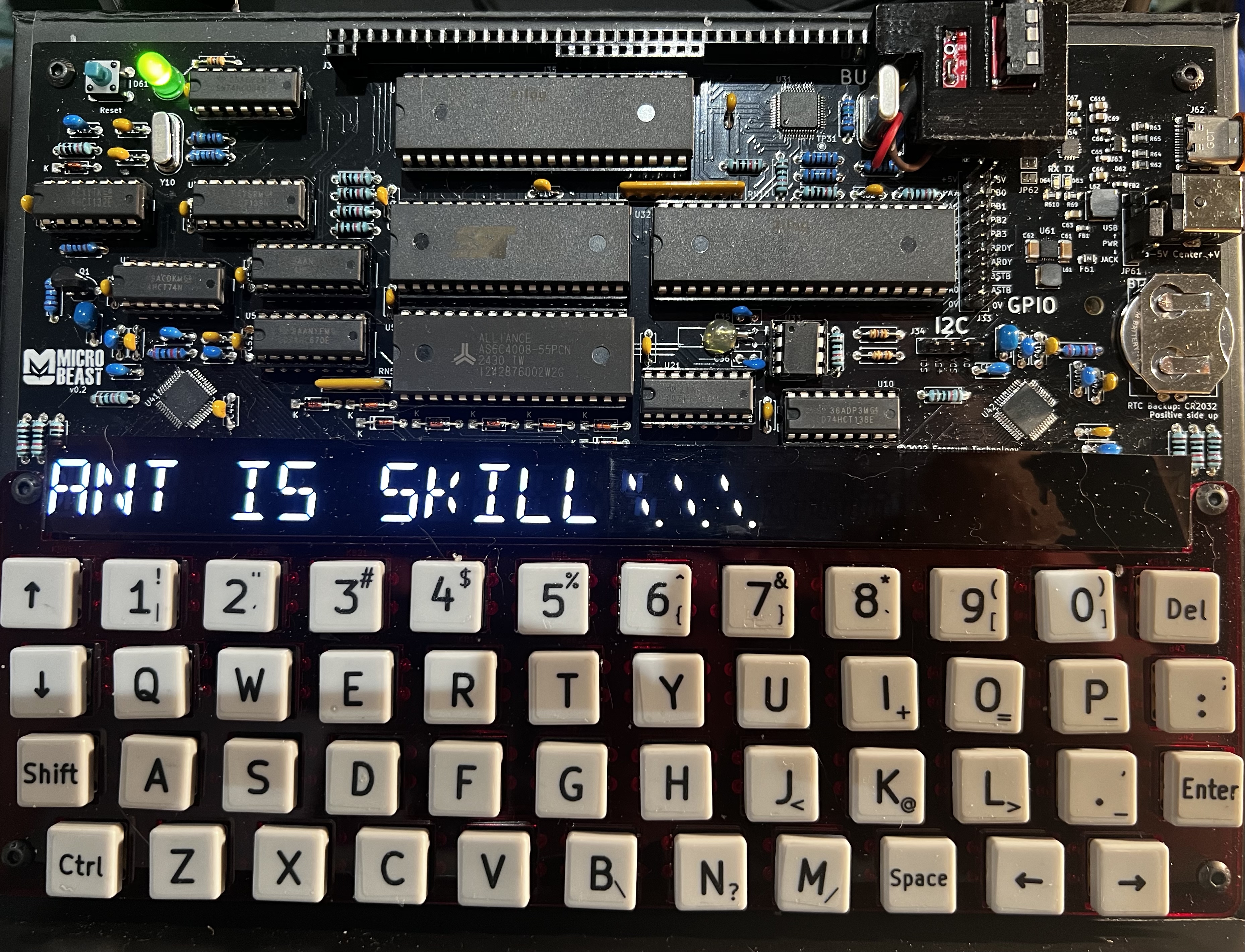
All being well, you should see this (your string might be different):
Things you can try
- How would you go about displaying the string backwards?
- What’s a different technique for displaying the string backwards?
- Can you combine (1) and (2) to come up with a novel (albeit faintly ridiculous) alternative for displaying the string forwards?
End of Part Eight
That’s it for Part Eight and our deeper dive into machine code and assembly language.
Next time we’ll look at making a machine code scrolltext!